Buying guide
Phone and Tablet Accessories in Canada: What to Buy, What to Skip
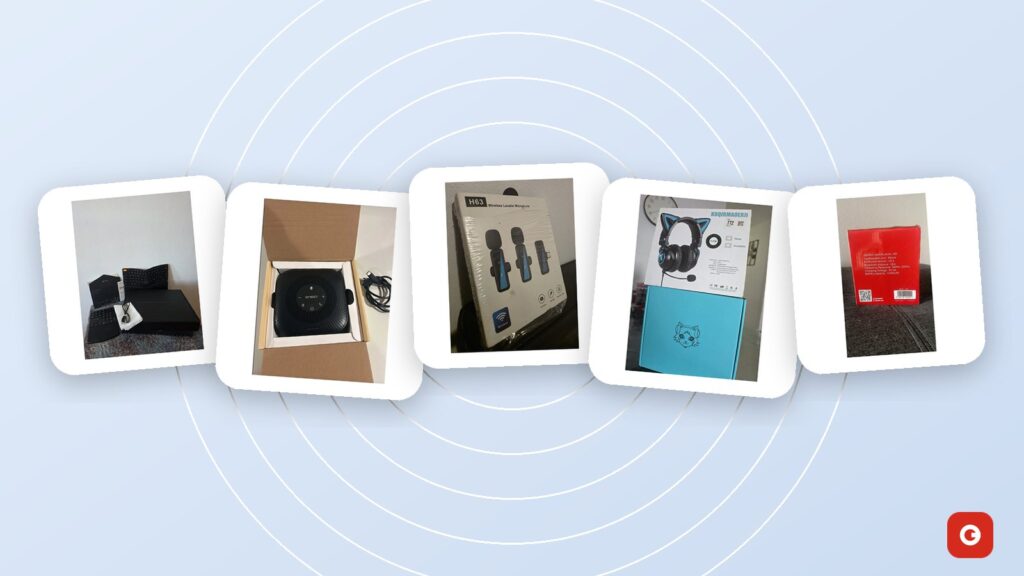
Phone and tablet accessories turn a good device into a useful one. A charger can refill the battery before work, a clip-on mic can make a video sound professional, and a keyboard can turn a tablet into a writing tool. Accessories are also where Canadians waste money: slow cables, cases that crack in the cold, and gadgets that don’t work with the phone they own.
Part 1 of this guide covers choosing the device itself in Canada: unlocked or carrier phones, network bands and 5G, eSIM, storage and updates, checks for open-box and used phones, tablets, and your rights with wireless providers. Part 2 goes through accessories by need, from chargers and microphones to keyboards, cases, the car and smart-home apps.
One thing up front: Gadget Canada, an independent store for open-box gadgets in Canada, doesn’t currently list phones or tablets, so Part 1 is independent advice. Part 2 includes the accessories we do sell, priced in Canadian dollars and described with only the compatibility their product sheets confirm. It also gives plain advice on the items we don’t carry.
Key takeaways
- Before you pay for a phone, check that it supports your carrier’s LTE and 5G bands and VoLTE calling, especially if it was made for another country.
- On an open-box or used phone, check the IMEI against the blacklist, make sure the previous owner’s account has been removed and look at battery health.
- USB-C with USB Power Delivery charges most current phones and tablets, and a certified cable rated for the wattage matters as much as the charger.
- Upgrade audio first: a wireless clip-on mic for phone video, a Bluetooth speakerphone for calls.
- Count only on the compatibility a product sheet states. When it says nothing, ask the seller before you order.
Choosing a phone in Canada: unlocked or carrier, bands, 5G and eSIM
Many accessory headaches start with the phone, so get the device right first.
Unlocked or from a carrier?
Under the CRTC’s Wireless Code, wireless providers in Canada have to sell phones unlocked and unlock older devices for free on request. So the real difference is how you pay. A carrier phone is usually financed over a set term, typically two years, and if you leave early, the remaining device balance is generally due. An unlocked phone bought outright costs more on day one, but it works with any compatible plan, including cheaper prepaid and bring-your-own-device plans.
| Unlocked, bought outright | Financed through a carrier | |
|---|---|---|
| Upfront cost | Full price | Low or nothing down, spread over the term |
| Switching providers | Any time, nothing left to pay on the phone | Remaining device balance usually due |
| Software | Updates straight from the maker | May include carrier apps; some Android updates arrive later |
| Best for | Deal-switchers, travellers, long-term owners | People who want the cost spread out and plan to stay |
Check the bands, 5G and calling support
A phone can be unlocked and still work poorly on your network. Phones made for other markets, including grey-market imports, may lack bands that Canadian carriers rely on, such as Band 66 (AWS) or Band 71 (600 MHz). Low bands travel farther and reach deeper into buildings, so a phone without them may show full bars downtown and nothing at the cottage. Canadian 5G also uses several bands, including 600 MHz (n71) and 3500 MHz (n77/n78), and a phone sold as “5G” elsewhere may not support the right ones.
Calling is the check people forget. Canadian carriers are retiring their 3G networks, so calls increasingly depend on VoLTE (voice over LTE) that works on your carrier. An imported phone without it may get data but fail to make or receive calls reliably. Before you buy, give the carrier the exact model number and ask it to confirm the bands, 5G, VoLTE and Wi-Fi calling.
eSIM
An eSIM is a SIM built into the phone that your carrier activates with a download. Canada’s major carriers and many of their brands support it, but not every prepaid or smaller brand does. It makes switching plans quick, and most recent phones can use it alongside a physical SIM for a work line or a travel data plan. Some phones are eSIM-only, notably recent iPhones sold in the United States, so check your carrier’s support before you buy across the border. To move an eSIM to a new phone, use your carrier’s app, a QR code or the phone’s transfer tool, and keep the old phone until the new one works. Whatever kind of SIM you use, set an account PIN with your carrier to make SIM-swap fraud harder.
Storage and software updates
Every iPhone and most flagship Android phones lack a memory-card slot, so the storage you buy is the storage you keep. As a rough guide, 128 GB is a sensible minimum; choose 256 GB if you shoot a lot of 4K video or keep your phones four years or more. Check the maker’s published update policy too. Commitments range from a few years on some budget models to seven years on some recent flagships, and the clock starts when the model launches, not when you buy it. A two-year-old model bought open box has two fewer years of security updates left.
Your rights with wireless providers
The CRTC’s Wireless Code also gives you some protections. Your provider must give you a plain-language summary of your contract’s key terms. You can cancel without early cancellation fees after two years, and new contracts come with a trial period, within usage limits set out in the Code. Data overage and roaming charges are capped unless the account holder agrees to pay more. In Québec, the Consumer Protection Act adds its own rules for wireless contracts. If your provider doesn’t fix a billing or service problem, the Commission for Complaints for Telecom-television Services (CCTS) handles complaints about wireless, internet, home phone and TV services at no cost to you. Its consumer pages explain how to file one. Keep your contract, bills and chat transcripts as proof.
Buying an open-box or used phone: the checks that matter
Open-box and used phones can save a lot of money, but a phone can be blacklisted, locked to someone else’s account or running on a tired battery. Our guide to open box vs refurbished vs new explains what each label means. Whatever the label, run these checks before you pay or, at the latest, within the return window.
- Find the IMEI. Dial *#06# or look in the phone’s settings, and make sure the number matches the box.
- Check the blacklist. Canadian carriers share a list of phones reported lost or stolen, and those phones can’t be activated on participating networks. Enter the IMEI in the wireless industry’s free Device Check service at devicecheck.ca, and ask whether the phone was financed and, if so, whether it’s paid off.
- Make sure the account lock is off. Activation Lock on an iPhone and Factory Reset Protection on Android tie the phone to the previous owner’s account. If they haven’t removed it, a reset won’t unlock the phone.
- Check battery health. iPhones show maximum capacity in the battery settings, and many Android phones show battery health or charge cycles in settings or a diagnostics tool. Below about 80%, most people notice the battery no longer lasts the day.
- Inspect and test. Look for scratches, dead pixels, burn-in on OLED screens and a bent frame. Then test calls on your own SIM, the speakers, mics, cameras and charging port, Wi-Fi, Bluetooth, GPS, the fingerprint reader or face unlock, and the buttons.
- Reset it yourself. Do a factory reset, then install the available updates before you restore your data.
- Note the return window and the warranty. Keep the box and receipt, and find out who backs the warranty: the seller, the manufacturer or nobody.
In Québec, the Consumer Protection Act provides a legal warranty: goods sold by a merchant, used goods included, must be fit for normal use and last a reasonable time. The Office de la protection du consommateur explains legal and conventional warranties. Elsewhere, read the seller’s return and warranty terms before you pay. When you retire your old phone, sign out of your accounts, remove the eSIM and reset it, then find a drop-off point through Recycle My Electronics.
Choosing a tablet: screen size, keyboards and kids
Screen size. Tablets around 8 inches are easy to hold for reading and travel. The 10 to 11 inch class is the all-rounder for streaming, video calls and homework. Tablets of 12 to 13 inches suit drawing, side-by-side apps and replacing a laptop, but they’re heavier and their keyboards and cases cost more.
Keyboard, stylus and ports. If you’ll type more than a few lines a day, plan for a keyboard from the start. Most tablets accept Bluetooth keyboards. Some also have a connector for a keyboard cover that needs no pairing or charging. Styluses are usually model-specific, so confirm which pen a tablet takes. A USB-C tablet can share a recent phone’s charger and can usually read USB-C drives, which helps when there’s no card slot. A cellular tablet needs its own data plan. For most households, a Wi-Fi-only model plus the phone’s hotspot on road trips is enough, if your plan allows tethering.
Kids. For children, the setup matters more than the specs. Use the built-in parental controls, such as Screen Time on Apple devices or Google Family Link on Android, to set time limits, filter content and approve purchases. Add a thick case with a handle, choose headphones with a volume limit (often around 85 dB) and keep the tablet updated: it still has a browser, apps and accounts.
Phone and tablet accessories by device: build your kit
That covers the device; now for what goes with it. Gadget Canada sells new and open-box electronics in Canada, but no phones or tablets for now. The rest of this guide covers the audio, video and car gear we stock, matched only to the uses each product sheet supports. It also gives general advice on things we don’t sell, such as chargers, cases and power banks.
Start with the device and what you do with it, not with a shopping list:
| Need | Phone | Tablet | What to check |
|---|---|---|---|
| Everyday charging | USB-C charger and cable | Higher-watt USB-C charger | Fast-charging standard, safety mark, cable rating |
| Power on the go | Power bank | Power bank with USB-C PD output | Output in watts; watt-hours for flights |
| Protection | Case and screen protector | Folio or rugged case | Corner protection; magnet and fingerprint-reader compatibility |
| Video and voice recording | Wireless clip-on mic | Wireless clip-on mic | Connector: USB-C or Lightning |
| Calls and meetings | Bluetooth speakerphone | Bluetooth speakerphone | Bluetooth support stated on the sheet |
| Typing | Rarely needed | Bluetooth keyboard or keyboard cover | Connection type and supported systems |
| Listening | Bluetooth speaker or headphones | Bluetooth speaker or headphones | Headphone jack, or an adapter for wired models |
| In the car | Secure mount and USB-C car charger | Headrest mount for passengers | Provincial distracted-driving rules |
The infographic below groups the essentials into three starter kits.
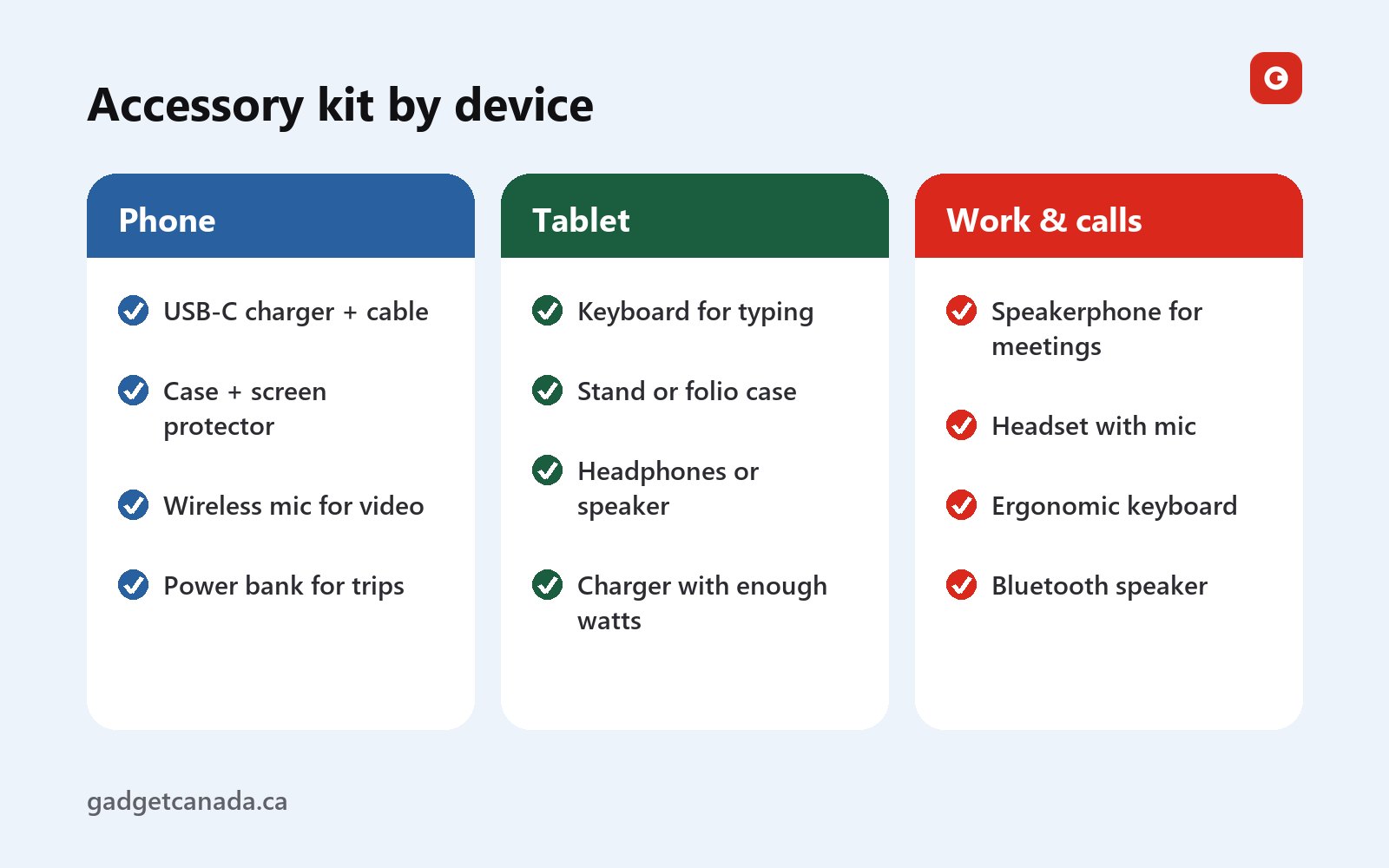
Treat them as starting points. A phone used mostly for messages needs little beyond a charger and a case, while one that films a weekly video needs a mic first. A child’s tablet needs a case and parental controls more than a keyboard; a work tablet is the opposite.
Build your kit: a step-by-step checklist
- List your devices and ports. Note whether each one uses USB-C or Lightning and whether it has a headphone jack or a card slot.
- Write down what you do. Calls, video, typing, music, driving, smart-home control. Every accessory should fix a real annoyance.
- Start with power. Buy one certified USB-C charger with enough watts for your largest device, and a cable rated for it.
- Protect what you’d hate to replace. Get a case and screen protector for the phone, and a case for the tablet, especially if kids use it.
- Add the one upgrade that changes your day. A mic for creators, a speakerphone or keyboard for remote workers, a mount and car charger for drivers.
- Check the product sheet. Look for the exact connector, Bluetooth support and supported devices. If the sheet doesn’t say, ask the seller.
- Test on arrival. Pair, charge and record a test clip in the first few days, well inside the return window.
Chargers, cables and power banks
USB-C and fast charging
Most phones and tablets now charge over USB-C, including every iPhone since the iPhone 15, so one charger and one type of cable can cover a phone, a tablet, earbuds and often a laptop. Keep a Lightning cable for older iPhones and iPads.
Fast charging works by negotiation: the device and the charger agree on a higher voltage or current, and the device takes only what it can handle. That means a charger with more watts than you need is safe. The common standard is USB Power Delivery (USB PD). Many Android phones also use PPS (Programmable Power Supply), part of USB PD, for their top speed. Some brands have their own fast-charging systems, which only reach full speed with the brand’s own charger. Check your device’s specifications for its exact figure; this table is a rough guide.
| Device | Typical fast-charging power | Charger to look for | Cable |
|---|---|---|---|
| Phone | About 20 to 45 W | USB-C PD, 30 W or more; PPS for many Android phones | Standard USB-C (60 W, 3 A) |
| Tablet | About 20 to 45 W | USB-C PD, 30 to 65 W | Standard USB-C (60 W, 3 A) |
| Laptop that charges over USB-C | About 45 to 100 W | USB-C PD to match the laptop’s adapter | 5 A cable (sold as 100 W or 240 W) |
| Earbuds, speakers, mic kits | Often 5 to 10 W | Any certified USB charger | The one that came with it |
Multi-port chargers share their power between ports, so check the per-port figures if you’ll charge a tablet and a phone at the same time. GaN (gallium nitride) chargers fit more watts into a smaller body. The lavalier mic kit and the ProtoArc EK04 keyboard in this guide come with USB charging cables, and the ZATEC LEO speaker charges over USB at 5 V / 1 A, so one multi-port charger can top up the whole kit as long as you pack each cable.
Cables and safety
Standard USB-C cables are rated for 60 W (3 A). Above that, you need a 5 A cable with a marker chip, sold as 100 W or 240 W. Many cheap cables also move data only at USB 2.0 speed, which is slow when you copy big video folders. For Lightning, look for Apple’s MFi certification. Chargers should carry a mark from a recognized certification body, such as CSA, cUL or cETL. Counterfeits are common online, and chargers and power banks turn up in the Government of Canada’s recalls and safety alerts, which you can search by brand. Replace any charger or cable that gets hot, crackles or is frayed.
Power banks
Our power bank buying guide for Canada goes into detail. In short, mAh is measured at the battery cell’s voltage, so a 10,000 mAh bank delivers less to your phone than the number suggests. Airlines require power banks in your carry-on, with limits in watt-hours. And a USB-C PD output of 20 W or more is what makes one useful for a tablet. On cold days, keep the power bank in an inside pocket. We don’t sell power banks at the moment.
Audio for phones and tablets: speakers, headsets and microphones
Bluetooth speakers
When you choose a speaker, check the Bluetooth version and rated range, the battery and how it charges, a water-resistance rating if it’ll be near water, and any extra inputs. The ZATEC LEO ($49.99), new in our Audio section, streams over Bluetooth 5.3 from a phone, tablet or computer, with a rated range of up to 10 metres. It also plays from a USB stick, a micro SD card or an AUX cable, so the party playlist doesn’t depend on anyone’s phone. It handles hands-free calls and has a 66 mm driver with Super Bass and a 1500 mAh battery. As a new item, it’s covered by our 1-year limited warranty. No water rating or playtime is listed, so keep it away from the pool.
Headsets and the missing headphone jack
Many phones and some tablets no longer have a 3.5 mm jack, so a wired headset needs a USB-C connection or a USB-C to 3.5 mm adapter with a built-in DAC (digital-to-analog converter). Bluetooth drops the cable but adds a slight delay you may notice in fast games. The KUQIRMAOERJI MIKO-J cat ear gaming headset ($59.99, open box) is wired, with a flexible mic and foam windscreen, 7.1 surround support and a padded, adjustable headband. Its sheet doesn’t state the plug type or supported devices. If you plan to use it with a phone or tablet, email support@gadgetcanada.ca with your model first.
Microphones for phone and tablet video
If you film on a phone, better sound is the upgrade that pays off first: viewers forgive soft footage faster than muddy audio. The H65/H63 dual wireless lavalier microphone kit ($44.99, open box) has two clip-on transmitters, for you and a guest, and a 3-in-1 receiver with USB-C, Lightning and 3.5 mm connectors. Its sheet says the USB-C connector suits Android phones, recent iPhones and iPads, and many laptops, while the Lightning connector suits older iPhones and iPads. It’s plug and play with no app, and foam windscreens help outdoors. The listing covers both the H65 and the H63, so if you need one specific connector, ask us which version ships. You’ll find it in Open Box Audio.
- Test the input. Record a short clip to confirm your app is using the receiver, not the built-in mic.
- Start charged. The receiver takes up the phone’s port, and the sheet doesn’t mention pass-through charging or battery life. Charge the phone and the mics first.
- Silence notifications. Turn on Do Not Disturb so an alert doesn’t interrupt the recording.
- Clip it in the right spot. Put the mic on a collar, away from scarves and zippers. In winter, clip it to the outside of your coat.
Filming on a dedicated camera? Our open-box cameras include a 4K vlogging camera that sends clips to your phone over Wi-Fi. Its sheet doesn’t list a mic input, so record your voice on the phone through the kit, then sync the two tracks when you edit.
Sound better on video and calls. Wireless lavalier mics, a conference speakerphone and a gaming headset, each opened, inspected and tested.
Tablet accessories for work and calls: speakerphones and keyboards
Speakerphones for calls
A phone’s speaker mode suits one person close to the screen. With three people around a table, the other end hears echo and the furnace. The EMEET OfficeCore M0 Plus ($45.99, open box) has omnidirectional mics with 360° pickup, plus noise and echo reduction. Its sheet confirms Bluetooth for calls from a phone or tablet, and plug-and-play USB with the included USB-C cable for a computer. EMEET lists it as compatible with Zoom, Microsoft Teams, Google Meet and other major video-conferencing apps. It has touch controls for volume, mute, pairing and calls, and comes with a hard carrying pouch. It’s a compact unit, so ask us before you use it in a large boardroom. Whichever speakerphone you use, select it as both the mic and the speaker in your meeting app.
Keyboards for tablets and multi-device use
For a tablet, Bluetooth keyboards are the simplest choice. iPadOS and Android both support them, and multi-device models switch between a tablet, a phone and a laptop at the press of a key. Keyboards with a USB receiver need a free port, which on most tablets means an adapter.
The ProtoArc EK04 wireless ergonomic keyboard ($59.99, open box) has a split, wave-shaped layout designed for a more relaxed typing posture, a padded wrist rest and a separate number pad, and it recharges with the included USB cable. Now the honest part: its sheet says it’s wireless, but not whether it uses Bluetooth or a USB receiver, or which systems it supports. So we can’t recommend it as a tablet keyboard; it’s a desk keyboard first. If you want to use it with a tablet, email us your model before you order. It’s in Open Box Computer Accessories. And if a tablet becomes your main screen, raise it to eye level on a stand and type on a separate keyboard. Your neck will thank you.
Cases, screen protectors and storage
We don’t sell cases or screen protectors, but they’re usually the first accessories people buy, so here’s what matters.
Cases. Drop protection comes down to the corners and a raised lip around the screen and the camera. Slim cases stop scratches, rugged ones suit job sites and kids, and folios protect a tablet and double as a stand. If you use magnetic chargers or mounts, choose a MagSafe- or Qi2-compatible case, since a thick or non-magnetic case weakens the hold.
Screen protectors. Tempered glass feels closest to the real screen, and replacing a protector costs far less than replacing a screen. Privacy protectors darken the screen when seen from an angle, and matte ones suit drawing with a stylus. If your phone has a fingerprint reader under the screen, buy a protector listed as compatible with it.
Cold weather. Lithium-ion batteries lose capacity in the cold, and a phone can shut down on a frigid day even with charge left. Keep it in an inside pocket, use touchscreen gloves at -20 °C, and let a cold phone warm up before you charge it.
Storage: microSD and the alternatives
Many Android phones and tablets still take a microSD card; iPhones and iPads don’t. Check the maximum capacity your device supports, then pick U3 or V30 for 4K video, or A1 or A2 for apps. Formatting a card as internal storage ties it to that device, so for photos and video, using it as portable storage is safer. Without a slot, most USB-C devices can open a USB-C flash drive or card reader in their file manager. For dash cams and security cameras, use a high-endurance card designed for continuous recording; ordinary cards wear out fast.
Phone accessories for the car: mounts, charging and dash cams
Every province has distracted-driving laws that restrict hand-held phone use while driving, and the rules on where you can place a mount vary, so check yours. Set your navigation before you pull out.
Mounts. Vent mounts are easy to fit but can sag, and they sit right in the heater’s hot air. Dash mounts with adhesive or suction can lose their grip in deep cold or heat, and magnetic mounts need a compatible phone or case. Keep the phone out of your view of the road and clear of the airbags, and don’t leave it baking on the dash in summer.
Charging. Many built-in USB ports, especially older USB-A ones, supply little power. A USB-C PD car charger in the 12 V socket charges far faster. If a dash cam already uses that socket, use the car’s USB-C ports or a splitter rated for the combined load.
Dash cams. We sell two in Open Box Dash Cams, both $69.99:
- S60 dual dash cam: records the front in 2.5K QHD and the rear in 1080P at the same time, through a 170° front lens with an f/1.8 aperture for low light. It has loop recording and a G-sensor that locks a clip after an impact, and it runs from the supplied car charger adapter. Parking mode needs a hardwiring kit, which isn’t included.
- TOGUARD CE50X mirror dash cam: fits over your rear-view mirror with a 7-inch touchscreen, records the road ahead in 1080P, and comes with a waterproof backup camera that shows guide lines when you reverse.
Neither sheet lists Wi-Fi or a phone app, so review clips on the built-in screen, or move the memory card to a computer or a card reader for your phone. Neither kit includes a card, so check the manual for the supported type and choose a high-endurance one.
Record every drive. Compare a 2.5K dual dash cam and a 7-inch mirror cam with a backup camera, both at $69.99.
Smart-home gadgets on your phone: cameras, apps and security
Your phone is also the remote control for home gadgets, especially security cameras, so the app and your account security matter as much as the camera. All of our open-box security cameras work through your phone:
- Geeni HAWK3 ULTRA 2K ($59.99): a plug-in Wi-Fi camera that sets up in the Geeni app with no hub, sends motion alerts to your phone and works with Alexa and Google Assistant.
- 4MP PTZ wireless solar camera ($79.99): a solar-charged Wi-Fi camera that you pan and tilt from your phone, with real-time motion alerts.
- SOLIOM S600-4G ($85.99): connects over 4G LTE instead of Wi-Fi and pans and tilts from your smartphone. It comes with an EIOTCLUB SIM card kit; you’ll need cellular coverage and a data plan at the site.
The Birdfy Cam also sends Full HD views of your bird feeder to a mobile app, while the AukonVee ES04 inspection camera has its own screen and needs no phone at all. Our outdoor security camera guide covers power, 4G, winter and privacy in depth.
- Set up on 2.4 GHz. Many smart cameras connect only on 2.4 GHz Wi-Fi, which also reaches farther outdoors than 5 GHz.
- Expect permission prompts. Camera apps usually ask for location (to find Wi-Fi networks), Bluetooth and notifications during setup. Review the permissions afterwards.
- Share access properly. Give family members their own logins through the app instead of your password, and set activity zones so alerts mean something.
A phone that controls your cameras deserves a strong screen lock, automatic updates and two-factor authentication on every linked account. If your router has a separate guest or IoT network, put smart devices on it. Get Cyber Safe explains how to secure your devices and secure your connections, including public Wi-Fi and Bluetooth. The Canadian Centre for Cyber Security’s guidance on Internet of Things (IoT) security applies directly to smart cameras. Before you sell a phone, sign it out of your camera accounts.
Products to consider: accessories we sell
Here’s every product we’ve mentioned, with what its sheet confirms about use with a phone or tablet. Where a sheet doesn’t say, we tell you. Prices are in Canadian dollars.
| Product | Price | Condition | Good for | Phone or tablet use, per the sheet |
|---|---|---|---|---|
| H65/H63 dual wireless lavalier microphone kit | $44.99 | Open box | Interviews, vlogs, podcasts | Receiver plugs into phones and tablets (USB-C, Lightning; 3.5 mm for cameras and computers); no app |
| EMEET OfficeCore M0 Plus speakerphone | $45.99 | Open box | Calls and small meetings | Bluetooth for phones and tablets; USB for computers |
| ZATEC LEO Bluetooth 5.3 speaker | $49.99 | New | Music at home or on the patio | Bluetooth from a phone, tablet or computer; also USB, micro SD, AUX |
| KUQIRMAOERJI MIKO-J cat ear gaming headset | $59.99 | Open box | Gaming and voice chat | Wired; plug type not listed, ask us first |
| ProtoArc EK04 wireless ergonomic keyboard | $59.99 | Open box | Long typing sessions at a desk | Connection type and systems not listed, ask us first |
| S60 dual dash cam | $69.99 | Open box | Front and rear recording | Works on its own; no app listed |
| TOGUARD CE50X mirror dash cam | $69.99 | Open box | Recording plus reversing help | Works on its own; no app listed |
| Geeni HAWK3 ULTRA 2K outdoor camera | $59.99 | Open box | Entrances near an outlet | Geeni app over Wi-Fi |
| 4MP PTZ wireless solar security camera | $79.99 | Open box | Yards within Wi-Fi range | Pan, tilt and alerts from your phone |
| SOLIOM S600-4G solar security camera | $85.99 | Open box | Sites without Wi-Fi | Pan and tilt from your smartphone over 4G LTE |
For phone video, the lavalier kit is the single most useful upgrade; add the 4K vlogging camera and the pair comes to $134.98 and ships free. For work, the EMEET speakerphone and the ProtoArc EK04 come to $105.98, past the $99 free-shipping threshold; confirm the keyboard’s connection with us first if a tablet is your main screen. For music, the ZATEC LEO is the clear pick for a phone or tablet. For the road, choose the S60 for sharper forward footage or the TOGUARD for help reversing.
Open box means the box has been opened, so these items aren’t sealed-new. We inspect and test each one before it ships, and our open-box grading guide explains how. Open-box items carry a 90-day limited warranty and new items a 1-year limited warranty (see our warranty page), and our returns and refunds policy gives you 30 days. Standard shipping is $14.99, or free across Canada on orders over $99, with 1–2 business days of processing and 3–7 business days for delivery. Questions about compatibility? Email support@gadgetcanada.ca, Monday to Friday, 9:00 to 17:00 ET. Gadget Canada is an independent retailer, not affiliated with any of these brands.
The bottom line
Get the device right first: unlocked or paid off, with the bands, 5G and VoLTE support your carrier needs, enough storage and years of updates left. If it’s open box or used, check the IMEI, the account lock and the battery before the return window closes, and turn to the CCTS if a problem with your provider won’t go away.
Then build the kit around what you actually do: a certified USB-C charger and cable first, protection second, then the one upgrade that fixes your biggest daily annoyance. Rely only on the compatibility a product sheet states, and ask when it doesn’t. For ideas beyond phones and tablets, see our guide to the best gadgets in Canada, or browse all our gadgets and accessories in Canada.
Kit out your phone and tablet. Wireless mics, a speakerphone, a gaming headset and car cameras at open-box prices, with a 90-day limited warranty and free shipping over $99.
Frequently asked questions
Should I buy an unlocked phone or one from my carrier in Canada?
Under the CRTC's Wireless Code, phones sold by Canadian wireless providers must be unlocked, so the real difference is how you pay. A carrier phone is usually financed over your plan's term, and the remaining balance is generally due if you leave early. An unlocked phone bought outright costs more upfront but works with any compatible plan, including prepaid and bring-your-own-device plans.
How do I check whether a used or open-box phone is blacklisted?
Dial *#06# to display the IMEI and make sure it matches the box, then enter it in the wireless industry's free Device Check service at devicecheck.ca. Also confirm the previous owner has removed the phone from their Apple or Google account, or a factory reset won't unlock it.
Will a phone bought outside Canada work on Canadian networks?
Sometimes. Compare the phone's LTE and 5G band list with your carrier's, and ask the carrier to confirm VoLTE calling for that exact model. Phones made for other markets may lack bands Canadian carriers use, such as Band 66 or Band 71, and some U.S. models are eSIM-only.
How many watts does a phone or tablet charger need?
Most phones and tablets fast-charge somewhere around 20 to 45 W, so a certified USB-C Power Delivery charger of 30 W or more suits many people, with PPS support for many Android phones. A higher-watt charger is safe because the device only draws what it negotiates. Check your device's specifications for its exact maximum.
Does the wireless lavalier mic kit work with iPhone and Android phones?
Its receiver has USB-C, Lightning and 3.5 mm connectors. According to the product sheet, USB-C suits Android phones and recent iPhones and iPads, and Lightning suits older iPhones and iPads. It's plug and play with no app. The listing covers the H65 and H63 versions, so ask us which one ships if you need a specific connector.
Can I use the EMEET M0 Plus speakerphone with my phone or tablet?
Yes. Its product sheet lists Bluetooth for calls from a phone or tablet, and USB with the included USB-C cable for a computer. Select it as both the microphone and the speaker in your meeting app's audio settings.
Does the ProtoArc EK04 keyboard work with a tablet?
Its product sheet describes it as wireless but doesn't say whether it uses Bluetooth or a USB receiver, or which systems it supports, so we can't confirm tablet use. Email support@gadgetcanada.ca with your tablet model before you order, and we'll check.
Does Gadget Canada sell phones or tablets?
Not at the moment. We sell accessories and gadgets, mostly open box, including wireless lavalier mics, a Bluetooth speaker, a conference speakerphone, a gaming headset, dash cams and security cameras. Start with Open Box Audio for phone and tablet audio gear.