Buying guide
Outdoor Security Camera Canada Guide: Power, 4G, Winter and Privacy
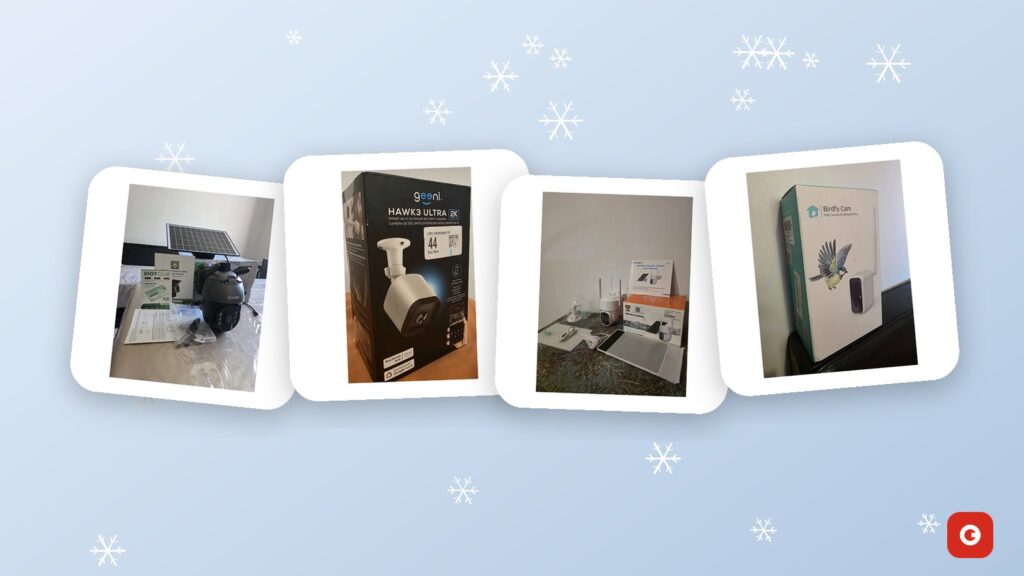
Choosing an outdoor security camera Canada’s winters won’t knock offline takes more than comparing megapixels. A camera that works perfectly on a July afternoon can stall in January: the battery shrinks in the cold, the solar panel sits under 10 cm of snow, the Wi-Fi barely reaches the garage and the lens is glazed with freezing rain. The right choice depends on three things most spec sheets bury: how the camera gets power, how its video leaves your property and how it copes with a Canadian winter.
This guide works through those decisions in order: power (plug-in, battery or solar), connection (Wi-Fi on 2.4 GHz or 4G LTE), image quality, night vision, motion alerts, PTZ, storage and weatherproofing. It then covers mounting heights, a step-by-step installation checklist, cybersecurity, privacy rules for home cameras, cottages and farms, and bird cameras. At the end, you’ll find a side-by-side look at the open-box security cameras and bird cameras we sell today, with prices in Canadian dollars.
One note before you start: no camera can guarantee that nothing goes missing. A well-placed camera lets you see what’s happening, get an alert and keep a record. Good lighting, solid locks and a neighbour who keeps an eye out still matter.
Key takeaways
- Settle power and connection first: plug-in suits spots near an outlet, solar suits spots without one, and 4G LTE suits properties with no Wi-Fi but reliable cellular coverage.
- Solar charging drops sharply in December and January, when days are short, the sun is low and snow covers panels. Face the panel south, tilt it steeply and keep it within reach for snow clearing.
- Cold reduces battery capacity, so cut false motion alerts in winter: every trigger wakes the camera and spends power the panel may not replace.
- Test the signal at the exact mounting spot before you drill: Wi-Fi on 2.4 GHz for Wi-Fi cameras, cellular reception for 4G models.
- Change default passwords, turn on two-factor authentication, keep firmware updated and aim cameras at your own property, not your neighbour’s windows.
Power first: plug-in, battery or solar
Power decides where a camera can go and how much attention it will need over the winter, so it’s the first question to settle. There are three common options for cameras you install yourself, plus a wired option that usually calls for a professional.
Plug-in cameras
A plug-in camera runs from a power adapter and an outlet. It never needs recharging, so a week of grey November skies or a -30 °C cold snap makes no difference to its power supply. Many plug-in models can also record continuously rather than only when motion is detected, because they aren’t trying to save battery. The trade-off is placement: the camera must sit within cable reach of an outlet, and the cable route has to be planned, clipped down and kept away from pooling water and the snowblower’s path.
If there’s no outlet where you need one, a licensed electrician can add a weatherproof, GFCI-protected receptacle with an in-use cover. That’s usually worth it for a front door or driveway camera you want to forget about. Avoid running an indoor extension cord through a window or door: the frame pinches it, moisture gets in and it becomes a tripping hazard. The Geeni HAWK3 ULTRA 2K outdoor camera is our plug-in example; it runs from a weatherproof power adapter with its own cable.
Battery cameras
Battery cameras mount almost anywhere, take minutes to install and suit renters. To make a charge last, they sleep until motion wakes them, so most record short clips rather than 24/7 video. How long a charge lasts depends heavily on how often they wake up: a camera facing a quiet backyard may go weeks between charges, while one facing a busy street can drain in days. Cold makes it worse. Lithium-ion batteries deliver noticeably less capacity in freezing temperatures, so a camera that lasted a month in September may need charging much sooner in January, and that means a ladder on an icy step.
Solar cameras
A solar camera is a battery camera with a small panel that tops up the battery during the day. Done well, it removes most of the charging chores. Done badly in a Canadian winter, it’s a battery camera with a panel under the snow. Three things work against solar from November to February:
- Short days. Around the winter solstice, Toronto gets roughly 9 hours of daylight, Edmonton about 7½ and Yellowknife about 5, compared with roughly 15½ hours in Toronto and 17 in Edmonton in late June.
- A low sun. At noon in late December, the sun sits only about 23° above the horizon in Toronto and about 13° in Edmonton. Low sun means long shadows: a 2 m fence casts a shadow nearly 5 m long at midday in Toronto, and houses, evergreens and garages shade spots that get full sun in summer.
- Snow and frost. A panel under snow produces next to nothing, and a thin layer of frost or freezing rain cuts output until it melts.
Cold adds a less obvious problem. Lithium-ion cells shouldn’t be charged below freezing, and many battery systems limit or pause charging in deep cold to protect the cells. On a bright -25 °C morning, the battery may take in little charge even with the panel in full sun, and catch up only as the day warms.
Getting the most from solar in winter
- Face the panel south, or as close to south as the site allows. An east- or west-facing panel loses part of an already short day.
- Tilt it steeply, roughly 60 to 70° from horizontal across most of southern Canada. A steep panel catches the low winter sun and sheds snow more easily than a flat one.
- Check for shade at midday in winter, not in summer. Stand where the panel will go around noon and look south: whatever blocks the sun then will block it all season.
- Use the panel cable. On cameras with a separate panel, the lens can face north to watch the driveway while the panel sits on the sunny side of the house.
- Keep the panel reachable. A panel mounted high for security but out of reach of a soft brush or roof rake will spend much of the winter buried.
- Go into winter with a full battery. A camera that starts December at 30% has no reserve for a week of cloud.
Both of our solar models are designed around this kind of setup. The 4MP PTZ wireless solar camera charges its built-in battery from a cable-connected panel and comes with a USB charging cable for top-ups, and the SOLIOM S600-4G has a separate panel you can aim independently of the lens.
Wired PoE systems
Power over Ethernet (PoE) sends power and data through a single network cable to each camera, usually with a recorder indoors. It’s dependable and suits large or permanent installations, but it means running cable through exterior walls, and it isn’t something we sell. The rest of this guide focuses on the plug-in and wire-free cameras most homeowners install themselves.
Wi-Fi or 4G LTE: how the video leaves your property
Every camera in this guide sends video to your phone over the internet. The question is which link carries it off your property: your home Wi-Fi, or a cellular network through a SIM card in the camera.
Wi-Fi: why 2.4 GHz matters outdoors
Most home routers broadcast on two bands. The 5 GHz band is faster but fades quickly through walls; the 2.4 GHz band is slower but reaches farther and gets through obstacles better. That’s why many outdoor and battery cameras connect on 2.4 GHz, and some support only that band. An outdoor camera’s signal also has to cross an exterior wall, and many Canadian walls are hard on Wi-Fi: brick, stone, concrete, stucco over metal lath, aluminium siding and energy-efficient windows with metallic coatings all absorb or reflect it.
If your router combines both bands under one network name, a 2.4 GHz-only camera usually still connects, but some struggle during setup. Check the manual; some routers let you separate the bands temporarily while you pair the camera.
How to check the signal before you buy or drill
- Stand at the exact mounting spot, not just in the general area, with your phone on the 2.4 GHz network if you can choose it.
- Stream a video and run a speed test. If your phone struggles there, expect the camera to struggle too.
- Read the number if you can. If a Wi-Fi analyser app shows signal strength in dBm, readings closer to zero are better. As a rough guide, about -67 dBm or stronger is comfortable for video, and weaker than about -70 dBm is where live view tends to stall.
- Test through the same wall. Close the door behind you so the signal passes through the same obstacles it will in daily use.
- Recheck after setup. Many camera apps show a signal indicator; watch a live view at night as well as by day.
If the signal is weak, move the router or a mesh node closer to that side of the house, ideally near a window facing the camera, or add an outdoor-rated access point. A camera at the end of a weak link drops offline, delivers alerts late and drains its battery faster as it keeps retrying.
Upload speed
Cameras upload. Home internet plans often have far less upload speed than download, and every camera streaming live view or sending clips to the cloud uses some of it. One or two cameras are rarely a problem on a modern plan, but a rural connection, a busy household and several cameras can add up. If live view lags in the evening when everyone is home, upload capacity is a likely suspect.
4G LTE: a camera with its own SIM
A 4G LTE camera carries a SIM card and connects to a cellular network the way a phone does, so it doesn’t need Wi-Fi or a router. That makes it the natural choice for a cottage closed for the winter, a back field, a barn far from the house or a job site. In exchange, it needs three things to work:
- A compatible SIM. The camera has to support the network the SIM connects to.
- An active data plan. Cellular cameras use mobile data every time you watch live or a clip uploads, so budget for a monthly or prepaid plan.
- Coverage at the mounting spot. Rural coverage drops behind hills, in valleys, inside metal buildings and under dense trees, and heavy wet snow on branches can weaken a marginal signal further.
Coverage maps are estimates. Stand at the planned spot, ideally at mounting height, and check your phone’s reception, keeping in mind that full bars on your phone don’t guarantee the camera’s SIM will connect, especially if it uses a different network. For the bigger picture, Innovation, Science and Economic Development Canada’s High-speed Internet for Canada site has information on internet availability across the country, including rural areas.
To keep data costs down, rely on short motion clips rather than long live sessions, and record to a memory card locally where the camera supports it. The SOLIOM S600-4G solar camera is the 4G option in our catalogue. Its box includes an EIOTCLUB SIM card kit; because we can’t confirm which networks it uses at your address, check coverage and plan options with EIOTCLUB before you mount it.
What happens in a power outage
Ice storms and winter windstorms knock out power across much of the country. When they do, a plug-in camera goes dark, and so does a battery camera on Wi-Fi, because the modem and router lose power too. A small uninterruptible power supply (UPS) on the modem and router can keep a Wi-Fi battery or solar camera online through a short outage. A solar 4G camera keeps working as long as its battery holds and the local cell site stays up.
Outdoor security camera Canada setups compared
Power and connection combine into a handful of practical setups. Pick the row that matches the spot you want to watch, then compare cameras within it.
| Setup | Best for | Ongoing cost | Winter weak spot | Our example |
|---|---|---|---|---|
| Wi-Fi + plug-in power | Front door, garage, deck or driveway with an outdoor outlet and good Wi-Fi | Optional cloud plan, depending on the camera | Goes offline in a power outage unless the camera and router are backed up | Geeni HAWK3 ULTRA 2K |
| Wi-Fi + battery only | Renters, quick installs and spots that are easy to reach | Optional cloud plan, depending on the camera | Cold shortens battery life, so expect more recharging trips | None in our current catalogue |
| Wi-Fi + solar battery | Side yards, sheds, back fences and garages within Wi-Fi range but far from an outlet | Optional cloud plan, depending on the camera | Short days, low sun and snow on the panel | 4MP PTZ wireless solar camera |
| 4G LTE + solar | Cottages, cabins, farms, job sites and long driveways without Wi-Fi | Cellular data plan | The same solar limits, plus marginal coverage in valleys and woods | SOLIOM S600-4G |
| Wired PoE + recorder | Large or permanent multi-camera systems | Usually none; footage stays on the recorder | Few once installed, but cable runs through exterior walls take planning | Not sold at Gadget Canada |
The illustration below sums up the three setups we sell, with the winter habits that keep each one running.
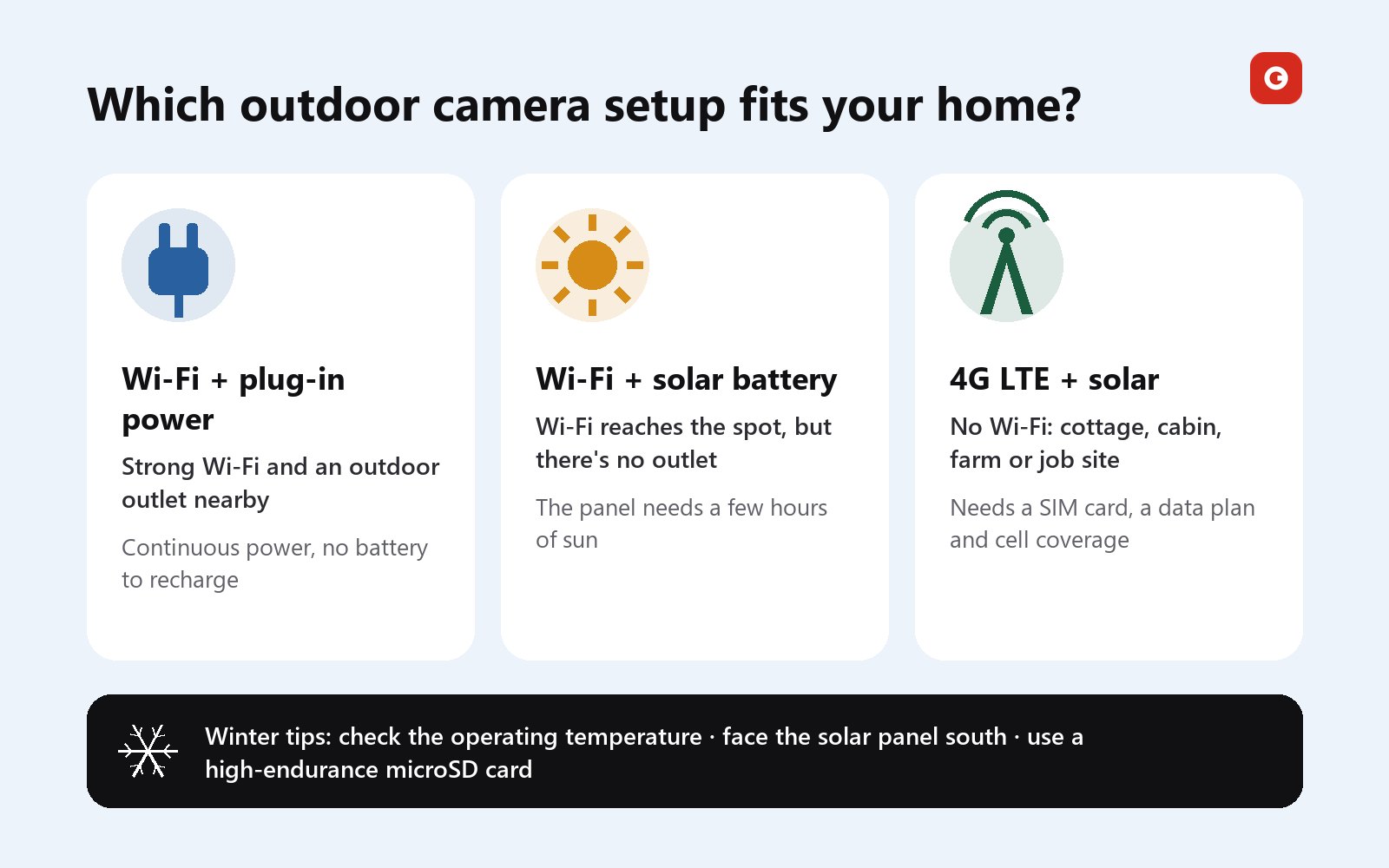
A quick rule of thumb: if an outlet is within reach, plug in; if Wi-Fi reaches but power doesn’t, go solar; if neither reaches, go 4G with solar, provided there’s coverage. Many homes end up mixing setups, such as a plug-in camera at the front door and a solar camera on the back fence.
Know which setup fits? Compare our plug-in, solar and 4G cameras side by side, each one opened, inspected and tested.
What you’ll see: resolution, lens, night vision, alerts and PTZ
Resolution: 1080p, 2K and 4MP
Resolution sets how much detail is in each frame. 1080p (Full HD) is about 2 megapixels. “2K”, “QHD” and “4MP” are marketed separately but describe roughly the same class of image, around 2560 × 1440 pixels, close to twice the detail of 1080p. 4K (8MP) doubles it again. More pixels help you read a face or a licence plate at a distance and zoom into a recording, but they also mean bigger files, more upload bandwidth, more storage and, on battery cameras, more power per clip. For most homes, 2K or 4MP is the sweet spot: clearly sharper than 1080p without the storage and bandwidth cost of 4K.
Lens and field of view
Detail depends on more than pixel count. A very wide lens covers more of the yard but spreads the same pixels across a bigger scene, so a person 10 m away fills only a small part of the frame. If you need to identify faces, put a camera close to where people pass, such as the front step or a side gate, and use wider views for overall awareness of a driveway or yard. Digital zoom on a recording only enlarges the pixels already there; it can’t add detail the camera didn’t capture.
Night vision
From November to February, much of your footage will be recorded in the dark, including most evening commutes. Cameras handle darkness in two main ways:
- Infrared (IR) night vision uses infrared LEDs the eye barely sees and records in black and white. It’s discreet and uses little power, but it has quirks. IR light bounces off nearby surfaces, so a camera tucked tight under an eave or beside a wall can wash out its own image, and it reflects off glass, which is why a camera behind a window sees mostly its own glare.
- Spotlight or floodlight night vision switches on visible light when motion is detected, giving colour footage and a visible deterrent. It uses more power, which matters for battery and solar cameras in winter.
Snow complicates both. Flakes falling close to the lens light up under IR and show as bright streaks, and a snow-covered yard reflects light back at the camera, which can flatten detail. Spider webs are the summer equivalent: a single strand across the lens can trigger alerts all night. Our three security cameras all have night vision; the SOLIOM S600-4G pairs its night-vision sensor with built-in LED floodlights, and the Geeni HAWK3 ULTRA is described as having enhanced night vision.
Motion detection and alerts
Alerts are what make a camera useful day to day, and false alerts are what make people switch them off. Cameras detect motion in two main ways:
- Pixel-based detection watches the image for change. It’s simple, but falling snow, rain, swaying branches, headlights and moving shadows can all set it off.
- Passive infrared (PIR) sensors, common on battery cameras, react to heat moving across their view. They’re good at spotting people, animals and cars and work best when movement crosses the frame rather than heading straight at the lens. Dryer vents, car exhaust and sun-warmed surfaces can trigger them.
Many cameras add person, vehicle or animal detection in the app, along with activity zones and sensitivity settings. Spend ten minutes on these after installation: exclude the street and the neighbour’s driveway, lower sensitivity facing a windy tree line, and choose person-only alerts if the camera offers them. In winter this matters twice over, because every false trigger wakes a battery camera, records a clip and spends power that short days may not replace.
PTZ: pan, tilt and zoom
A PTZ camera has a motorised head that turns left and right (pan) and up and down (tilt) on command from your phone; some also zoom. One PTZ camera can sweep a yard, a parking area or a farmyard that would otherwise take two fixed cameras. The catch is that it looks one way at a time: if someone walks in while the lens points elsewhere, a fixed wide camera would have caught them. PTZ works best where you want to look around on demand, such as checking the dock, the shed and the lane from one post, or alongside a fixed camera on the main entrance.
Both of our solar models pan and tilt from your phone, and the SOLIOM S600-4G is listed with 360° panoramic coverage. Neither listing mentions optical zoom, so don’t count on it. Moving parts and ice don’t mix: after freezing rain, let a PTZ head thaw before you ask it to turn.
Storage: microSD cards or the cloud
A camera that sends alerts but keeps no recording is only half useful. Footage is stored in one of two places, and many cameras support both.
Local microSD
A microSD card in the camera records with no monthly fee, keeps footage on your property and keeps working when the internet drops. The weak points: if someone takes the camera, the card goes with it, and cards wear out. Every recording writes to the card, and loop recording overwrites the oldest footage once it fills, so a camera recording around the clock writes all day, every day. Ordinary cards meant for photos aren’t built for that.
- Buy a high-endurance card. Endurance cards are designed for continuous recording in dash cams and security cameras.
- Check the maximum capacity your camera supports in its manual before you buy; a bigger card is no use if the camera can’t read it.
- Format the card in the camera when you install it, through the app or the camera’s settings.
- Play back a recording every month or two. A failing card often shows up as missing or corrupted clips before it stops altogether.
- Check the card’s temperature rating on its packaging if the camera will spend the winter outside.
Cloud recording
Cloud storage uploads clips to the manufacturer’s servers. Footage survives if the camera is stolen or damaged, and it’s easy to share. In exchange, you usually pay a monthly or yearly fee, recording depends on your upload connection, and your video lives on someone else’s servers, so read what a plan covers and how long it keeps clips. Some cameras put features such as person detection or longer history behind a subscription; others are designed to work without one. According to its manufacturer, the Geeni HAWK3 ULTRA is designed to work without a mandatory subscription.
Continuous or event recording?
Plug-in cameras can often record around the clock. Battery and solar cameras almost always record events only, short clips triggered by motion, because continuous recording would drain the battery. For a front door, event clips plus good alerts are usually enough. For a farm gate or a cottage lane where you want to know exactly when the plow came through, check how long clips last and whether the camera keeps a few seconds from before the trigger.
None of our current product sheets lists the storage options for these cameras, so check each camera’s manual for microSD support and cloud plans, or email support@gadgetcanada.ca before you order. The endurance-card advice applies to dash cams too, since they write to a card on every drive.
Built for Canadian weather: cold, snow, ice and rain
Outdoor cameras in Canada face a wider range than most: summer heat on a south wall, freezing rain in Ontario and Québec, wet coastal winters in British Columbia, blowing snow on the Prairies and deep cold across the North. A few specs and habits decide how a camera copes.
Weatherproofing and IP ratings
Many cameras list an IP (ingress protection) rating. The first digit covers dust and the second covers water: IP65 means dust-tight and protected against water jets, IP66 against powerful jets and IP67 against brief immersion. For a camera exposed to driving rain and snowmelt, IP65 or higher is a sensible minimum when a rating is given. Our security camera listings describe weatherproof housings designed for rain and snow, and the Geeni’s for rain, sun, wind and frost, but they don’t quote an IP number.
Operating temperature
The operating temperature range is the spec that matters most in a Canadian winter, and the one most often left off the box. Compare its low end with the coldest nights where you live. A camera rated to -20 °C rarely sees colder than that in Vancouver or Victoria, but Winnipeg, Regina, Saskatoon and Edmonton drop below it most winters. None of our current camera listings states an operating temperature range, so if your camera will face prairie or northern cold, email support@gadgetcanada.ca and we’ll check what we can for that unit before it ships.
Snow, ice and freezing rain
- Mount under an eave or a small hood to keep snow and freezing rain off the lens, but not so tight under it that IR night vision bounces back.
- Keep solar panels out from under the eave; they need open sky even when the camera doesn’t.
- Watch for falling ice. Avoid spots below icicles, roof valleys or a metal roof that sheds snow in sheets.
- Stay clear of the snowblower and the plow. A camera at knee height beside the driveway will be buried or sprayed with salty slush.
- Clear the lens gently. Use a soft brush or cloth. Don’t chip at ice or pour hot water on a lens or panel; let freezing rain melt off.
- Expect brief fogging during big swings. A sudden thaw after a deep freeze can mist a lens for a while. It usually clears on its own; moisture inside the housing is a reason to contact the seller.
Cables, mounts and cold plastic
Leave a drip loop, a small downward curve, in every cable before it enters a wall or adapter, so water drips off instead of running along the cable into the connection. Seal holes through siding with exterior-grade sealant. Plastic turns brittle in deep cold, so don’t force a frozen ball joint or overtighten screws in January. If you can, install in early fall, before the ground freezes and the ladder sits on ice.
Weather warnings are worth acting on. Environment and Climate Change Canada’s weather.gc.ca forecasts and warnings tell you when a cold snap, heavy snowfall or freezing rain is coming, which is the moment to top up a battery, check a panel’s angle or confirm a remote camera is reporting, rather than after the storm.
The outdoor security camera Canada checklist: placement and installation
Where to put cameras
Start with the routes people actually take onto your property rather than the spots that are easiest to mount on:
- Front door and porch: where deliveries arrive and most visitors appear.
- Driveway and garage: vehicles, the garage side door and anything stored outside.
- Back door, patio and gate: entry points hidden from the street.
- Sheds, outbuildings and side yards: often far from an outlet, which is where solar earns its keep.
Mounting height and angle
A common rule of thumb is roughly 2.5 to 3 m (8 to 10 ft) off the ground: high enough that the camera can’t easily be knocked down or covered, low enough to show faces rather than the tops of toques. Angle it down slightly so the frame shows mostly ground and people rather than sky. Mounting higher, such as under a second-storey eave, gives a wider view of a driveway but loses facial detail, so pair a high overview with a lower camera near the door when identification matters.
Mind the sun. In winter it stays low all day, so a lens facing south looks into it for hours, and east- or west-facing lenses catch sunrise and sunset glare. Where you have the choice, aim lenses away from the sun and put the solar panel, not the lens, on the south side. Before fixing anything, check the frame for privacy too: it should cover your property, not your neighbour’s windows or yard.
Step-by-step installation checklist
- Sketch what you need to see. Mark the door, gate or driveway each camera must cover and the direction people approach from.
- Confirm power at each spot. For a plug-in camera, find the outlet and map the cable route. For solar, check for winter shade at midday and decide where the panel goes within reach of its cable.
- Test the signal at the exact spot. Check Wi-Fi on 2.4 GHz for a Wi-Fi camera, or cellular reception for a 4G camera, at mounting height if you can.
- Charge and set up indoors first. Fully charge a battery or solar camera, install the app, create the account with a strong, unique password, turn on two-factor authentication if it’s offered, pair the camera and install any firmware update. For an open-box camera, a factory reset before pairing, following the manual, ensures it starts from default settings.
- Insert and format the microSD card if you’re using one, and choose your cloud settings.
- Do a dry run. Hold or temporarily fix the camera at the spot, check the live view, walk through the frame and confirm you get an alert and a usable clip.
- Mount it at roughly 2.5 to 3 m, angled slightly down, with fixings suited to the wall: wood, vinyl siding over sheathing, brick and concrete each need different screws or anchors.
- Mount and aim the solar panel facing south, tilted steeply, clear of shade and within reach of a brush for snow.
- Route and seal cables with a drip loop and exterior sealant around any hole through the wall.
- Tune detection. Set activity zones, sensitivity, person alerts and privacy masks so the camera ignores the street and your neighbours’ property.
- Test at night and in bad weather, then adjust the angle and IR settings to remove glare and false alerts.
- Keep the paperwork and plan upkeep. Note the model and serial number, keep the receipt and original box until the return window closes, and put a reminder in your calendar to check recordings every month or two and the panel after every storm.
If something doesn’t work as expected in the first weeks, our open-box cameras are covered by a 90-day limited warranty, and our returns and refunds policy gives you 30 days to send a camera back in the condition you received it. The open-box grading guide explains how we inspect and test each unit before it ships.
Cybersecurity and privacy rules for home cameras in Canada
An outdoor camera is a small computer on your network that streams video of your home. Treat it like one, and treat the people it records the way you’d want to be treated.
Lock down the camera and the account
- Replace any default password on the camera and its app account with a long, unique passphrase, ideally stored in a password manager. Never reuse your email or banking password.
- Turn on two-factor authentication (2FA) for the camera account and for the email address linked to it, since that email can reset everything else.
- Keep firmware and the app updated. Turn on automatic updates if the app offers them, and check for updates after setup and every few months.
- Secure the Wi-Fi. Use WPA2 or WPA3 encryption, change the router’s admin password and keep its firmware current. If the router offers a separate guest or IoT network, putting cameras and other smart devices on it keeps them apart from your computers.
- Share access properly. Use the app’s sharing feature to give family members their own logins instead of handing out your password, and remove access when it’s no longer needed.
- Turn off what you don’t use, such as audio or remote features you never touch, and review the app’s permissions on your phone.
- Retire devices cleanly. Before selling or giving away a camera, remove it from your account and factory-reset it. At the end of its life, Recycle My Electronics helps you find a drop-off point for the camera and its battery.
The Government of Canada’s Get Cyber Safe program explains how to secure your devices and secure your accounts with strong passphrases and multi-factor authentication, and the Canadian Centre for Cyber Security has a short guide to Internet of Things (IoT) security that applies directly to smart cameras.
Privacy rules for home cameras in Canada
Recording your own property is common. The rules that apply to a particular situation depend on who is recording, where and why, and they can differ between provinces, so treat what follows as general information rather than legal advice. A few principles keep home cameras on the right side of the rules and of your neighbours:
- Point cameras at your own property. Avoid capturing neighbours’ windows, yards and other private spaces, and limit how much of the sidewalk and street you record to what’s needed to cover your entrances.
- Use privacy masks. Many apps let you black out part of the frame; use them for a neighbour’s window or the hot tub over the fence.
- Think twice about audio. Sound carries over fences and captures conversations people expect to be private, and it raises additional legal questions. Switch it off unless you have a clear need.
- Keep only what you need. Loop recording and short cloud retention mean footage isn’t kept forever; delete clips you no longer need.
- Be careful about sharing. Posting a clip of an identifiable person online can do real harm, even if you’re sure of what you saw. If a crime happened, give the footage to the police rather than social media.
- Tell guests. If you rent out a cottage or have regular visitors, let them know about outdoor cameras, and never put a camera where people expect privacy.
If cameras are part of a business, such as a farm stand, a rental property or a shop, privacy obligations for organizations may also apply. In Québec, the Civil Code and the Charter of human rights and freedoms also recognize the right to respect for private life. For the official view, start with the Office of the Privacy Commissioner of Canada’s guidance on surveillance and privacy.
Cottages, cabins and farms: watching a property without Wi-Fi
Many of the places Canadians most want to watch are the hardest to cover: a cottage closed from Thanksgiving to Victoria Day, a hunting cabin up a logging road, a barn a few hundred metres from the farmhouse, a sugar shack in the maple bush. They usually share three problems: no Wi-Fi, no outlet and no one around to fix things.
Pick the connection first
If the cottage has internet that stays on all winter, a Wi-Fi solar camera can work, provided the router stays powered and you have a plan for outages. If the internet is shut off when you close up, or never existed, a 4G LTE camera with solar power is the practical choice, as long as there’s coverage at the mounting spot. Wi-Fi rarely stretches from a farmhouse to a distant barn; distance, trees and metal walls see to that. A 4G camera at the barn sidesteps the problem.
Plan for a winter without visits
- Test coverage in person before relying on it, and again after the leaves are down, since marginal spots can change with the seasons. The availability information on the ISED site linked above is a starting point, but your phone at the actual spot is the real test.
- Make snow less of a problem. Mount the panel steeply on a south-facing wall or post where snow slides off, and ask a neighbour or your snow-removal contractor whether they can brush it after big storms.
- Budget the data. A camera you check once a day uses far less than one you stream for hours. Event clips and brief check-ins keep a cellular plan in check.
- Cover what you’d otherwise drive up to check. A camera on the lane shows whether the plow came, whether the road is passable and whether anyone has been in. One on the dock or boathouse shows ice and storm damage.
- Run a closing-day check. Before you leave for the season, confirm the battery is full, the panel is clean, alerts reach your phone and recordings play back.
Farm and rural notes
Barns, equipment yards and gates are natural PTZ territory: one camera that turns can check a yard, the barn door and the lane from a single post. Mount high on a building or a solid post rather than a fence a tractor might bump, keep cameras out of reach of livestock and away from barn exhaust fans, and wipe the lens more often in dusty seasons such as harvest. On a job site, a 4G camera can watch materials and access points before permanent power is run.
The SOLIOM S600-4G is designed for exactly this: 4G LTE instead of Wi-Fi, a separate solar panel, pan and tilt from your phone, and LED floodlights with night vision. Remote viewing lets you see what’s happening without the drive out, but no camera stops a determined intruder on its own; a good lock, a gate and a neighbour who knows when you’re away still count. We ship anywhere in Canada, and our shipping policy lists processing and delivery times.
Bird and wildlife cameras
Not every outdoor camera is about security. Bird cameras have become a favourite backyard gadget, partly because Canadian winter feeders are so lively: chickadees, nuthatches, juncos and jays are familiar visitors across much of the country, and northern cardinals brighten feeders in southern Ontario and Québec. Summer brings hummingbirds, from the first ruby-throats in May to the last stragglers in September.
What’s different about a bird camera
- Distance. Birds are small, so a bird camera works close up, right beside the feeder or nest box. A security camera across the yard will catch the squirrel, not the plumage.
- Background. A hedge or fence behind the feeder makes a better backdrop than bright sky, which turns birds into silhouettes.
- Wi-Fi at the back of the yard. Feeders often hang far from the house, so test the signal there first.
- Snow and hygiene. Brush snow off the housing and lens after storms, and keep the feeder clean, which matters for the birds as much as for the picture.
The Birdfy Cam FHD bird watching camera ($49.99) sits near a feeder, nest box or tree and sends Full HD video and photos to your phone over Wi-Fi through a built-in antenna. Our product sheet doesn’t list its power source, mounting hardware or operating temperature, so if it will face a prairie winter, email us before you order. For summer, the smart hummingbird feeder with HD camera ($59.99) builds the camera into the feeder, captures visits automatically and is designed to identify the species that come to feed. Both are in Open Box Pool & Garden.
Wildlife at the cottage or farm
A security camera with motion detection and night vision doubles as a wildlife camera. Point one at the compost, the garbage enclosure or the edge of a field and you’ll learn who visits after dark, whether it’s raccoons, foxes, deer or a coyote crossing the yard. Treat it as observation, not bait: don’t put out food to draw larger animals into view, keep bins closed and feeders clean, and if a nest box is in frame, watch from the screen rather than opening it. In Canada, the active nests of most native songbirds are protected under the federal Migratory Birds Convention Act.
Watching birds, not burglars? Our feeder and bird-watching cameras are open box, tested and ready for the next cold snap or the first hummingbirds.
Products to consider: our open-box outdoor cameras
Here’s how the outdoor cameras we currently sell compare. Everything in the table comes from our product descriptions; where a detail isn’t listed, we say so rather than guess. Prices are in Canadian dollars.
| Camera | Price | Power | Connection | Image | Movement | Night and alerts | Also worth knowing |
|---|---|---|---|---|---|---|---|
| SOLIOM S600-4G | $85.99 | Separate solar panel + rechargeable battery | 4G LTE, EIOTCLUB SIM card kit included | Not listed on our product sheet | Pan/tilt, 360° panoramic coverage | LED floodlights and night-vision sensor | Weatherproof housing designed for rain, snow and rough weather |
| 4MP PTZ wireless solar camera | $79.99 | Solar panel + built-in rechargeable battery; USB charging cable included | Wi-Fi | 4MP HD | Pan and tilt | Night vision; motion detection with real-time phone alerts | Indoor or outdoor use; wall/ceiling mount included |
| Geeni HAWK3 ULTRA 2K | $59.99 | Weatherproof power adapter (plug-in) | Wi-Fi, no hub required | 2K Quad HD | Adjustable wall/ceiling mount | Enhanced night vision; motion alerts | Works with Amazon Alexa and Google Assistant |
| Birdfy Cam FHD | $49.99 | Not listed on our product sheet | Wi-Fi with built-in antenna | Full HD | Fixed, placed near a feeder or nest box | App to watch, record and share sightings | Compact housing designed for outdoor use |
| Smart hummingbird feeder with HD camera | $59.99 | Not covered on our product sheet | Images viewed on your phone | Built-in HD | Hangs from its built-in hook | Automatic capture when a bird is detected | Designed to identify visiting species |
SOLIOM S600-4G solar security camera: $85.99
For a cottage, farm, job site or long gravel lane with no Wi-Fi. The Open Box SOLIOM S600-4G Solar Security Camera connects over 4G LTE, recharges its built-in battery from a separate solar panel and pans and tilts from your phone. In the box: the camera, the solar panel with cable, an EIOTCLUB SIM card kit, mounting screws and a screwdriver, manuals and the original box. Check coverage and plan options with EIOTCLUB for your address first.
4MP PTZ wireless solar security camera: $79.99
For a yard, driveway, garage or small shop where Wi-Fi reaches but an outlet doesn’t. The Open Box 4MP PTZ Wireless Solar Security Camera shows a 4MP HD picture, turns horizontally and vertically on command and sends a real-time alert when it detects motion. Its panel connects by cable, so within the cable’s reach it can sit somewhere sunnier than the camera. The kit includes a wall/ceiling mount, screws and anchors, a USB charging cable and a user manual.
Geeni HAWK3 ULTRA 2K outdoor camera: $59.99
For a front door, garage or deck with an outdoor outlet nearby. The Open Box Geeni HAWK3 ULTRA 2K Outdoor Security Camera records in 2K Quad HD, sets up in the Geeni app without a hub and lets you bring up the feed on a compatible smart display through Alexa or Google Assistant. It comes with an adjustable wall/ceiling mount, the weatherproof power adapter with cable, screws and anchors and a quick start guide, and it’s the lowest-priced of our three security cameras.
For the car: open-box dash cams at $69.99
Dark commutes, salt film and memory cards that have to cope with constant recording apply on the road too. The S60 dual dash cam records 2.5K QHD at the front and 1080P at the rear through a 170° front lens, with loop recording and a G-sensor that locks clips on impact. The TOGUARD CE50X mirror dash cam fits over your rear-view mirror with a 7-inch touchscreen, 1080P recording and a waterproof backup camera with guide lines. Neither kit includes a memory card. Compare them in Open Box Dash Cams.
Ordering, shipping and warranty
Open box means the box has been opened, so these cameras aren’t sealed-new; we inspect and test each one before it ships. Every open-box camera carries a 90-day limited warranty and 30-day returns in the condition you received it. Standard shipping is $14.99, free across Canada on orders over $99, with 1–2 business days of processing and 3–7 business days for delivery. One camera on its own sits under the threshold, but pairing two often clears it: the Geeni and the 4MP PTZ together come to $139.98, and the Birdfy Cam with the hummingbird feeder camera to $109.98. Questions about a specific unit? Email support@gadgetcanada.ca, Monday to Friday, 9:00 to 17:00 ET. Gadget Canada is an independent retailer, not affiliated with any of these brands.
The bottom line
The best outdoor camera for a Canadian property is the one still working in February. Settle power and connection first, based on the spot you actually want to watch: plug in where there’s an outlet, go solar where Wi-Fi reaches but power doesn’t, and choose 4G with solar where neither reaches but cellular coverage does. Then weigh resolution, night vision and PTZ, plan storage around an endurance card or a cloud plan, and give the camera the winter habits it needs: a south-facing, steeply tilted and reachable panel, a full battery going into the cold and motion zones that ignore the street.
Finally, lock the account down with a strong password, two-factor authentication and regular updates, and keep the lens on your own property. If you’re weighing open box against new for a camera or anything else, our guide to open box vs refurbished vs new explains the differences, and the Gadget Canada home page shows everything else we carry.
Ready for winter? Choose a plug-in, solar or 4G camera at open-box prices, with a 90-day limited warranty and free shipping over $99.
Frequently asked questions
What type of outdoor security camera works best in a Canadian winter?
It depends on the spot. A plug-in camera is the most dependable in the cold because it doesn't rely on a battery or the sun. Where there's no outlet, a solar camera works if the panel faces south, is tilted steeply and is cleared after snowfalls. Check the camera's operating temperature range against your region's coldest nights.
Do solar security cameras work in winter in Canada?
Yes, with limits. Short days, a low sun and snow on the panel reduce charging from November to February, and cold reduces battery capacity. Face the panel south, tilt it steeply, keep it clear of snow, cut false motion alerts and start the winter with a full battery.
Should I choose a Wi-Fi or a 4G LTE security camera?
Choose Wi-Fi if your network reaches the mounting spot with a solid signal, ideally on the 2.4 GHz band. Choose 4G LTE for a cottage, farm or site without Wi-Fi, as long as there's cellular coverage there; you'll need a compatible SIM and a data plan. The SOLIOM S600-4G solar camera is our 4G option.
How high should I mount an outdoor security camera?
About 2.5 to 3 m (8 to 10 ft) is a common rule of thumb, angled slightly down. That keeps the camera out of easy reach while still showing faces. Mount solar panels where you can reach them with a brush to clear snow.
What microSD card should I use in a security camera?
Use a high-endurance card designed for continuous recording, in a capacity your camera supports according to its manual. Format it in the camera when you install it and play back a recording every month or two to catch a failing card early.
Can I point my security camera at the street or my neighbour's yard?
The rules depend on the situation and the province, so check the Privacy Commissioner of Canada's guidance for the official view. As a general principle, aim cameras at your own property, avoid capturing neighbours' private spaces, limit recording of public areas to what's needed and use privacy masks.
How do I keep my security camera from being hacked?
Replace default passwords with a long, unique passphrase, turn on two-factor authentication, keep the firmware and app updated, secure your Wi-Fi with WPA2 or WPA3 and change your router's admin password. A separate guest or IoT network adds another layer.
What warranty comes with an open-box security camera from Gadget Canada?
Each open-box camera is inspected and tested before it ships and carries a 90-day limited warranty, plus 30-day returns if it comes back in the condition you received it. Shipping is $14.99, or free across Canada on orders over $99.