Buying guide
USB-C Charger Guide for Canada (2026): Watts, GaN, Cables and Power Banks
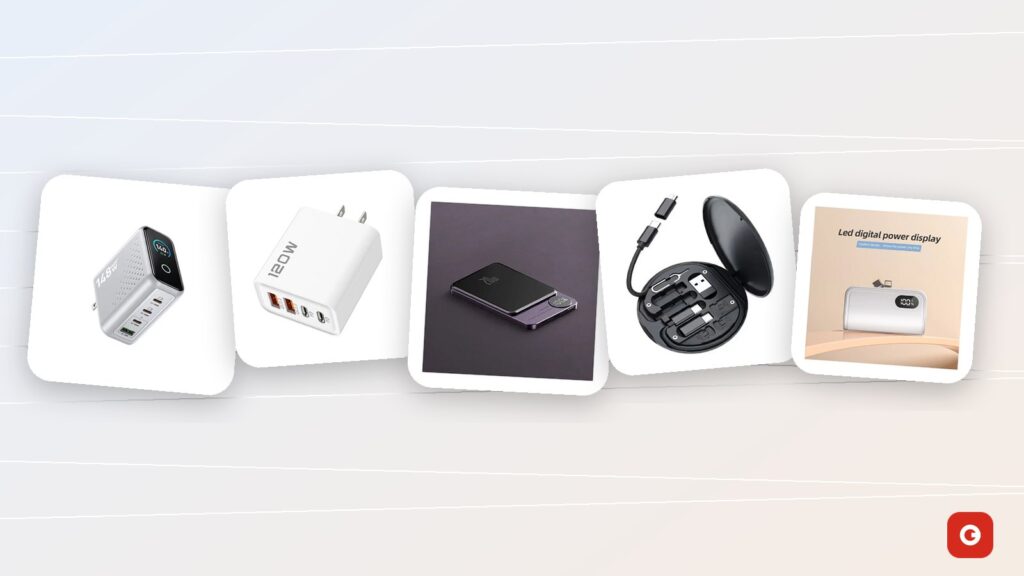
Open the junk drawer in almost any Canadian home and you’ll find a short history of charging: a Micro-USB cube from a first tablet, a frayed Lightning cable, the adapter from a router nobody owns any more and a laptop brick the size of a sandwich. A good USB-C charger can retire most of that pile. The catch is that USB-C chargers all look alike, while the small print on the label (watts, PD, QC, GaN, 3 A, 5 A) decides whether your laptop charges at full speed or barely keeps up.
This guide explains how to choose a USB-C charger in Canada in 2026: the watts your devices really use, the charging standards, GaN, multi-port sharing and cables, then power banks, the car, Canadian winters and travel, and safety, with a checklist to use before you buy.
Gadget Canada is an independent online store for new and open-box electronics in Canada. In November 2026 we added new, sealed charging products to our phone and charging accessories. They appear here with their CAD prices and only the facts their product sheets state; where a sheet is silent, on per-port wattage for example, we say so.
Key takeaways
- Add up the watts. A phone typically charges at 18–45 W and a thin laptop at 45–65 W, and a multi-port charger’s rating is a total shared by everything plugged in.
- For phones, tablets and laptops, look for USB-C Power Delivery (PD). Quick Charge 3.0 matters for Android devices that use it over USB-A.
- GaN makes a charger smaller and more efficient for the same power. It doesn’t change how many watts your devices accept.
- Above 60 W over USB-C you need a 5 A e-marked cable; a 3 A cable tops out around 60 W.
- Read the label and check the federal recalls site before trusting a bargain charger, and recycle old chargers and batteries instead of binning them.
What a USB-C charger is, and why it replaced the drawer of bricks
USB-C is a connector: the small, oval, reversible plug now found on most new phones, tablets and earbud cases, and on a growing share of laptops. It replaced Micro-USB on Android devices, Lightning on iPhone 15 and later, and the barrel plugs many laptops used for years. One connector shape across devices is the reason one charger can now serve a whole household.
The shape says nothing about speed, though. The same port can deliver a trickle or enough power for a laptop, depending on the charging standard the charger and the device share, the cable between them and the device’s own limit. A USB-C charger is simply a charger with at least one USB-C port; a good one also speaks USB Power Delivery, explained below.
Watts, volts and amps in one minute
Charging power is measured in watts (W), which are volts (V) multiplied by amps (A). Older USB-A chargers ran at a fixed 5 V, which is why they were slow. Small gadgets are still happy with that: the ZATEC LEO Bluetooth speaker charges over a standard USB cable at 5 V / 1 A, or 5 W, so almost any USB port will do. Phones, tablets and laptops want far more, and USB Power Delivery gets there by raising the voltage after a quick digital handshake with the device.
A bigger charger won’t overload a smaller device
With USB Power Delivery, the device asks for what it can handle and the charger supplies that, no more. A phone on a high-watt laptop charger simply takes its usual amount, which is what makes one multi-port charger practical for a whole family, provided the charger itself is well made.
What USB-C doesn’t fix
Plenty of earbuds, cameras and kids’ gadgets still use Micro-USB, and iPhones before the 15 series use Lightning. Our 60W travel cable kit includes USB-C to USB-A and USB-C to Micro-USB adapters, though no Lightning adapter is listed on its sheet. Keep one cable for each older device you still use, and recycle the rest of the drawer.
How many watts do you need for a phone, tablet or laptop?
Start with your devices, not the charger. Each one has a maximum charging power it will accept: paying for more on a single port buys nothing, and paying for less means waiting. The infographic below shows typical ranges.
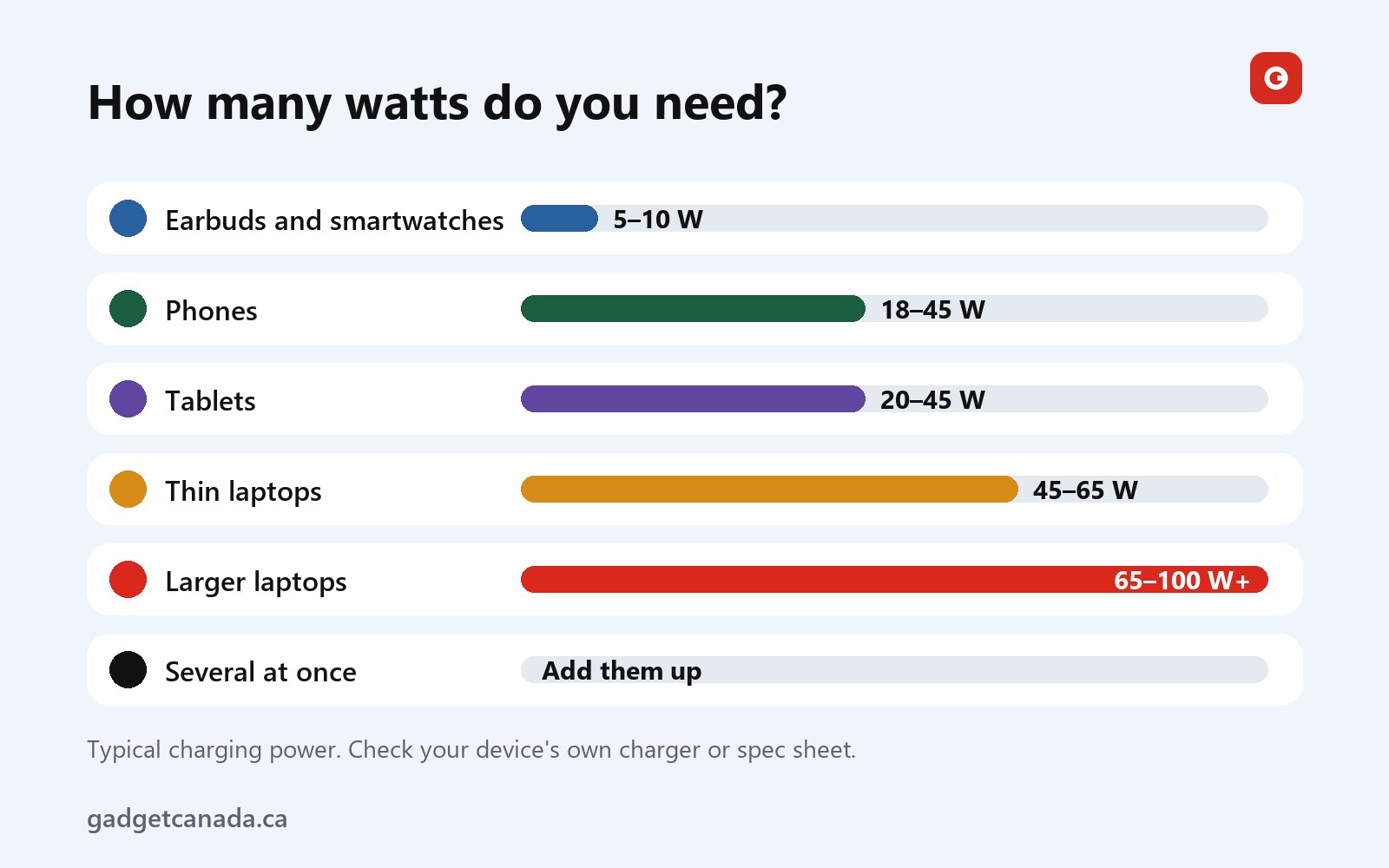
To find the real number for your own device, read the “Output” line on its original charger. It lists pairs of volts and amps, and the highest pair multiplied together is the maximum: 9 V at 3 A is 27 W, and 20 V at 3.25 A is 65 W. Spec sheets usually say “fast charging up to” a number of watts, or mention USB PD.
Phones and tablets
Most phones take around 18 to 45 W at their fastest, and tablets around 20 to 45 W. A bigger number helps less than you’d think: phones charge fastest when the battery is low, slow down near full to protect it, and throttle themselves when warm. If yours climbs from 20% to a comfortable level over a coffee, your charger is doing its job.
Laptops
This is where watts matter. Thin and light laptops often charge at 45 to 65 W, while larger ones and those with powerful processors may want 65 to 100 W or more. Check the wattage on your laptop’s original adapter. On a weaker charger, a USB-C laptop usually still charges, only slowly, and under heavy use it may barely hold its level. More watts than the laptop needs is fine, since it takes only what it asks for.
Several devices at once: add them up
The infographic’s last line is the one people forget. Using the typical ranges:
- Phone and earbuds: roughly 25 to 55 W at peak.
- Phone and tablet: roughly 40 to 90 W if both fast-charge at once.
- Thin laptop and phone: roughly 65 to 110 W.
- Thin laptop, tablet and phone: up to roughly 155 W at the top of every range, though the phone and tablet ease off as they fill.
Peaks rarely line up for long, so you don’t need to match the worst case. You do need a charger where the device you care about most, usually the laptop, gets its full share.
USB PD, PPS and Quick Charge 3.0, explained
Fast charging is a conversation: the charger and the device agree on a voltage and a current. It only happens when the charger, the cable and the device support the same standard; otherwise charging almost always still works, just more slowly.
USB Power Delivery (PD)
USB PD is the fast-charging standard built for USB-C. The charger announces what it can supply, the device picks what it needs, and the charger raises the voltage to match. Many current phones, tablets and laptops charge this way, including recent iPhones with a USB-C port. The standard USB PD range goes up to 100 W. A newer extended power range (EPR) goes higher for demanding laptops, and it needs a charger and a cable rated for it.
PPS (Programmable Power Supply)
PPS is part of USB PD. It lets a phone fine-tune the voltage in small steps as it charges, and some phones rely on it to reach their top speed. Your phone’s spec page or manual will say whether that top speed needs a PPS charger. Our sheets don’t say whether our 120W or 148W chargers support PPS, so if it matters for your phone, ask our team before you order. Without PPS, such a phone still charges over USB PD, typically below its top advertised speed.
Quick Charge 3.0 (QC 3.0)
Quick Charge 3.0 is a separate fast-charging standard that many Android devices use, typically over USB-A. A phone without QC still charges from a QC port, at its regular speed. The 120W 4-port wall charger pairs two USB-A Quick Charge 3.0 ports with two USB-C PD ports, handy in homes that mix USB-C devices with older Android gear. The 148W charger’s sheet lists one USB-A port without naming a fast-charging standard, so use its USB-C ports for anything that needs speed.
| Standard | Port | Typical users | What to check |
|---|---|---|---|
| USB Power Delivery (PD) | USB-C | Many phones, tablets and laptops | Total watts, and the port’s watts for a laptop |
| PPS (part of USB PD) | USB-C | Some phones, for top speed | Whether the charger lists PPS |
| Quick Charge 3.0 | Usually USB-A | Many Android devices | That the phone and the port both list QC 3.0 |
| Basic USB at 5 V | USB-A or USB-C | Earbuds, speakers, small gadgets | Nothing special |
GaN chargers: what changes and what doesn’t
GaN stands for gallium nitride, a semiconductor material that replaces some of the silicon parts in a charger. It handles power more efficiently, so less energy is lost as heat, and that lets a designer fit the same output into a smaller case.
- What changes: size for the power. A GaN charger is usually smaller than a traditional one of the same rating, which matters in a laptop bag and makes high-wattage multi-port chargers practical to carry.
- What doesn’t: your devices’ limits. A phone that accepts 25 W still takes 25 W.
- What doesn’t: standards and sharing. A GaN charger still needs USB PD to fast-charge your laptop, and a GaN multi-port charger still divides its total between ports.
- What doesn’t: build quality. “GaN” on a label isn’t a safety certification, and every charger gets warm under load, so give it some air.
We won’t quote efficiency percentages or temperatures, because they depend on the design and the load.
Where our chargers stand
The 148W GaN charger with LED display uses what its manufacturer calls a new-generation GaN³ design, described as compact and light enough for a travel bag, with pins that fold flat so they won’t scratch the laptop in the same pocket. Read “GaN³” as the manufacturer’s name for a newer design, not as a measurable standard. The 120W charger’s sheet doesn’t describe it as GaN, so we don’t either; its manufacturer calls the case compact and designed not to block the neighbouring socket. Neither sheet lists dimensions, so measure tight spots behind furniture and ask us.
Is GaN worth it? If you carry a charger every day, travel often or want one block for a USB-C laptop, yes. For a nightstand charger that tops up one phone, it’s a nice extra. Spend on the right wattage and a good cable first.
Multi-port USB-C chargers and power sharing: 120W vs 148W
A multi-port charger is the simplest way to clear a crowded power bar: one outlet, one block, every device. But the stated wattage is the total maximum output, not what each port delivers, and when several devices charge at once, the charger divides that total between them.
How sharing works
A device plugged in alone can typically draw more than when three others share the block, and each charger publishes its own split, usually as per-port figures. On many multi-port chargers, plugging in or unplugging a device makes the ports renegotiate, so charging may pause for a moment. That’s normal.
If a laptop is part of your setup, you need to know what its port can deliver while the others are busy. Our sheets for the 120W and 148W chargers give the totals but not per-port maximums, and we won’t invent them. Check your laptop’s original adapter and email us before relying on either charger as the laptop’s main power source. Then:
- Give the laptop the best port. On the 148W charger, the manufacturer identifies USB-C port C1 as the optimized high-power port.
- Put phones and tablets on the other USB-C ports, and older gadgets on USB-A.
- In a hurry, unplug the extras for half an hour. Overnight, sharing barely matters.
Our two wall chargers side by side
| Feature | 120W 4-port charger | 148W GaN³ charger |
|---|---|---|
| Price | $19.99 | $89.99 |
| Total maximum output | 120W, shared | 148W, shared |
| USB-C ports | 2, Power Delivery | 3, Power Delivery, including the optimized C1 |
| USB-A ports | 2, Quick Charge 3.0 | 1, no fast-charging standard listed |
| GaN | Not stated | GaN³, per the manufacturer |
| Live power display | Not listed | Round LED display |
| Foldable pins | Not listed | Yes |
| Colour | Black or White, your choice | No colour option; ask us |
| Cable in the box | No | No |
Choose the 120W four-port charger if you mainly charge phones, tablets and accessories, if your home mixes USB-C devices with USB-A and Quick Charge 3.0 gear, or if you want four ports on a kitchen counter or a dorm desk for $19.99.
Choose the 148W GaN³ wall charger if a USB-C laptop is part of your daily setup, if you want three USB-C ports, or if you travel and value folding pins. According to the manufacturer, its round LED display shows charging power and how it’s being distributed in real time, so you can see whether a device is fast charging, has eased off near full, or is being held back by a tired cable.
Both list protection against overvoltage, overheating, short circuits and overcurrent, and both have two-prong plugs for North American outlets, as pictured. Neither sheet lists per-port maximums or an input voltage range.
One outlet, every device. Three USB-C ports, a live power display and folding pins on the 148W GaN charger, new and sealed for $89.99.
Cables matter: 3 A vs 5 A, e-marked cables and the travel kit
A charger can only deliver what the cable is rated to carry, and identical-looking USB-C cables aren’t equal. When a powerful charger seems to underperform, the cable is often the limit.
3 A, 5 A and e-marked cables
Most USB-C to USB-C cables are rated for 3 A. At the 20 V that USB PD uses for its higher power levels, 3 A tops out around 60 W, enough for phones, tablets and many thin laptops. Above 60 W, the cable must be rated for 5 A, and a 5 A cable carries a small e-marker chip that tells the charger it can handle the extra current. Without it, the charger holds back to about 60 W. Extended power range charging, above 100 W, needs a cable rated for it.
| Cable | Carries up to | Good for |
|---|---|---|
| USB-A to USB-C | Depends on the port; QC 3.0 when both ends support it | Phones, earbuds, speakers |
| USB-C to USB-C, 3 A | Around 60 W | Phones, tablets, thin laptops |
| USB-C to USB-C, 5 A e-marked | Above 60 W, to the 100 W standard range | Larger laptops |
| Micro-USB cable or adapter | Standard speeds | Older phones and small gadgets |
Replace any cable that’s frayed, kinked, discoloured, hot or loose at the connector. Tape isn’t a fix. And note that our 120W and 148W chargers ship with just the charger and a user manual, no cable: your phone cables will do for phones, but a laptop above 60 W needs a 5 A e-marked cable.
The 60W travel cable kit
The 60W travel cable kit with adapters and SIM slots ($39.99) gathers the basics in one round, hard, tangle-free case: a USB-C to USB-C cable for charging and data, three adapters (USB-C to USB-A, USB-C to Micro-USB and a third our sheet doesn’t name, so ask us), slots for Nano SIM, Micro SIM and TF (microSD) cards, and a SIM ejector pin. It comes in Black or White.
The 60W figure comes from the product title and is the kit’s rated maximum, a good match for phones, tablets and laptops that charge at up to 60 W. Through the USB-A and Micro-USB adapters, expect ordinary speeds. iPhone 15 and later work with the main cable, while older Lightning iPhones need their own. Cable length and data speed aren’t on our sheet, so email us if you need a specific length.
Charging on the go: three power banks compared
A power bank is a charger you carry, so the same rules apply, plus two more questions: capacity, and how it connects to your phone. We carry three new, compact power banks. For mAh, watt-hours and real-world charge counts, see our power bank buying guide for Canada.
| Feature | 10,000 mAh slim magnetic | Magnetic wireless with kickstand | Mini pocket |
|---|---|---|---|
| Price | $79.99 | $69.99 | $29.99 |
| Capacity | 10,000 mAh (typically 36–38 Wh) | Not stated; printed on the unit | Not stated; printed on the unit |
| Charges your phone by | Magnetic wireless; wired also listed | Magnetic wireless | Built-in Lightning or USB-C connector, by version |
| Rated output | 20 W maximum | 15 W wireless | Not stated |
| Display | Round LED, percentage | Digital display | LED, percentage |
| Stand | Not listed | Fold-out kickstand | Fold-out stand |
Which power bank suits you?
The 10,000 mAh ultra-slim magnetic power bank ($79.99) is the pick for a stated capacity and the highest rated output of the three, 20 W maximum. It snaps onto a MagSafe-compatible phone or case and charges wirelessly, and wired charging is also listed. Our sheet doesn’t split the 20 W between the two, and your phone decides what it draws. The manufacturer says it can fully recharge a phone more than once.
The magnetic wireless power bank with kickstand ($69.99) charges at up to 15 W wirelessly and folds out a stand, shown at about 60° in the manufacturer’s images, which makes it the one for shows on the train and video calls. The manufacturer says it can also top up earbuds and a smartwatch, provided they charge wirelessly. Its capacity isn’t on our sheet and the images show more than one marking, so ask us to confirm it for the stock we ship.
The mini pocket power bank with a built-in connector ($29.99) plugs straight into your phone, so there’s no cable to forget. The connector is Lightning or USB-C depending on the version, so confirm which one is in stock before ordering. It has a fold-out stand, an LED percentage display and a cable for recharging it. Capacity and output aren’t on our sheet: think commute top-up, not weekend supply.
Wireless and magnetic charging: the trade-offs
- Convenient, but less efficient. Wireless charging loses more energy as heat than a cable, so you get fewer phone charges from the same pack.
- You need magnets. MagSafe-compatible phones and cases attach directly; other phones need a magnetic case or ring and wireless charging support.
- Cases and plates matter. Thick cases weaken the magnetic hold, and a metal plate like the one supplied with magnetic car mounts can block wireless charging.
Because both of our wall chargers have USB-C and USB-A ports, either one can refill a power bank overnight through its charging cable. MagSafe is a trademark of Apple Inc.; these are third-party accessories, not made or endorsed by Apple.
Power that fits a pocket. Three new power banks from $29.99: a 10,000 mAh magnetic pack, a wireless pack with a kickstand and a mini with a built-in connector.
In the car: USB-C car chargers vs a magnetic mount
In a car, the power source is the 12 V accessory socket, the one many of us still call the cigarette lighter. A USB-C car charger plugs in there and works like a wall charger: look for a USB-C port with USB Power Delivery and enough watts, and remember that several ports share a total. Many built-in USB-A ports, especially in older vehicles, were designed mainly for music and charge slowly, so if your phone barely gains charge with navigation running, a USB-C PD car charger is usually the fix. Some sockets switch off with the ignition and others stay live; your owner’s manual will say which.
A mount holds; it doesn’t charge
We don’t sell a USB-C car charger at the moment, so the advice above is general. What we do sell for the car is the magnetic car phone mount with a foldable 360° arm ($29.99). It sticks to the dashboard with an adhesive base and holds MagSafe-compatible phones and cases, with a metal plate included for other phones. No charging function is listed on its sheet, so don’t mistake it for a charger: for power, run a cable from a car charger or top up from a power bank when you stop.
Dash cams share the socket
Many dash cams also run from the 12 V socket. The open-box S60 dual dash cam, for example, uses its supplied car charger adapter in the cigarette lighter socket. If your car has a single socket, decide what plugs in there before buying both a dash cam and a car charger. Our open-box dash cams are tested before shipping and carry a 90-day limited warranty.
Drive safely
Hand-held phone use while driving is illegal across Canada, and the rules on mounted devices vary by province. Set your navigation before you pull out, keep the mount and cable clear of your view of the road and of the airbags, and keep cables away from the pedals. In winter, install an adhesive mount in a warm cabin or garage.
Charging in Canada: cold, cottages, flights and outlets abroad
Winter and lithium-ion batteries
Cold temperatures temporarily reduce the performance of lithium-ion batteries. A phone showing 40% at a January bus stop can drop sharply or shut down, then recover once it warms up. Keep your phone and power bank in an inside pocket, not in a bag on the snowbank, and don’t leave a power bank in the car during a cold snap or on the dashboard in July sun. When gear comes in from the cold, let it reach room temperature before you charge it.
Cottages and cabins
Cottages rarely have as many outlets as the family has devices. One multi-port charger on the kitchen counter becomes the charging station, and the cable kit covers older Micro-USB gadgets. Open-box gear charges from the same block: the dual wireless lavalier mic kit charges with its included USB cable, and the open-box 4MP PTZ solar camera comes with a USB cable so you can top up its battery before you climb the ladder.
Flying with power banks
Power banks and spare lithium batteries go in your carry-on, never in checked baggage. Packs under 100 Wh are generally allowed, packs of 100 to 160 Wh need airline approval, and a 10,000 mAh pack is typically around 36 to 38 Wh. Check your airline’s rules and CATSA’s guidance on what you can bring before you fly; no seller can promise how a security check will go. For our mini and kickstand power banks, the capacity is printed on the unit, and we can confirm it before you order.
Outlets abroad and public USB ports
Canada and the United States use the same plug types and 120 V outlets. Elsewhere you need a plug adapter, which changes the shape of the plug but not the voltage, so check that the charger’s label lists the local voltage. Many chargers accept 100–240 V, but read the label: our 120W and 148W sheets don’t list an input range, so check the unit or ask us before relying on either overseas. And think twice about unknown airport or hotel USB ports, which can carry data as well as power; your own charger in an outlet avoids the question. Get Cyber Safe has more device-security tips, and our travel tech essentials guide covers the rest of the packing list.
USB-C charger safety: counterfeits, recalls and recycling
A charger stays plugged in for years, often overnight beside a bed. It deserves a minute of scrutiny.
Spotting a counterfeit or a bad charger
- A price that doesn’t add up, such as a brand-name charger at a fraction of its usual price from a seller with no contact details.
- A suspiciously light block claiming a laptop-class rating. High wattage needs real components.
- A poor label. It should show input and output ratings and the manufacturer, without spelling mistakes, and a certification mark from an organization accredited to certify electrical products for Canada, such as CSA, cUL or cETL.
- Vague claims. “Fast” means little without a standard and a wattage.
In fairness, here’s what our own sheets say: both wall chargers list protection against overvoltage, overheating, short circuits and overcurrent, but the sheets don’t list certification marks. If you want to know what’s printed on the unit we ship, email support@gadgetcanada.ca and we’ll check the label.
Day to day, charge on a hard surface with some airflow, never under a pillow, and keep chargers away from sinks. Retire any charger with a cracked case or loose pins, or one that smells hot or buzzes, and stop using any power bank or phone that swells.
Recalls and complaints
Chargers and power banks are recalled from time to time. Health Canada posts consumer product recalls on the Government of Canada’s Recalls and safety alerts site, so search it before you buy and now and then for gear you own. If a product’s marketing misled you, for example with a wattage it can’t deliver, the Competition Bureau deals with deceptive marketing, and the Office of Consumer Affairs offers plain-language consumer guidance.
Recycle, don’t bin
Never put lithium batteries in the garbage or the blue bin, where a damaged cell can start a fire. Recycle My Electronics lists drop-off locations for electronics, and EPRA, the industry-led not-for-profit behind it, explains the programs in participating provinces. Power banks and loose batteries may go through a separate battery program, depending on where you live, and some drop-off points ask you to tape the terminals. Keep one spare charger and cable, and recycle the rest.
Our USB-C chargers compared, with a before-you-buy checklist
Here’s our whole charging range in one place, new and sealed, with CAD prices. It sits alongside the rest of our gadgets and phone accessories in Canada.
| Product | Ports or connector | Power | Best for | Price |
|---|---|---|---|---|
| 120W 4-port fast wall charger | 2 USB-C PD, 2 USB-A QC 3.0 | 120W total, shared | Phones, tablets, a family charging station | $19.99 |
| 148W GaN³ charger with LED display | 3 USB-C PD (C1 optimized), 1 USB-A | 148W total, shared | A USB-C laptop plus phone and tablet, travel | $89.99 |
| 10,000 mAh slim magnetic power bank | Magnetic wireless; wired also listed | 20 W maximum | All-day top-ups, known capacity | $79.99 |
| Magnetic wireless power bank with kickstand | Magnetic wireless | 15 W wireless | Videos and calls on the go | $69.99 |
| Mini pocket power bank | Built-in Lightning or USB-C, by version | Not stated | Cable-free top-ups | $29.99 |
| 60W travel cable kit | USB-C cable, 3 adapters, SIM and TF slots | Rated up to 60W | Travel, older Micro-USB gadgets | $39.99 |
| Magnetic car phone mount | Magnetic head; metal plate for other phones | Doesn’t charge | Navigation on the dashboard | $29.99 |
Which charger for which setup
| Your setup | What it needs | Our suggestion |
|---|---|---|
| One phone on the nightstand | One USB-C PD port | 120W charger ($19.99), with ports to spare for a watch or earbuds |
| Family counter: two phones, a tablet, earbuds | Several ports, USB-A and QC 3.0 for older Android gear | 120W charger |
| USB-C laptop, phone and tablet at a desk | A high total and a strong laptop port | 148W charger with the laptop on C1, and a 5 A e-marked cable above 60 W |
| Hotel room or carry-on | Compact, folding pins, one set of cables | 148W charger and cable kit ($129.98 together, so shipping is free) |
| Commute and lectures | A pocket top-up | Mini pocket power bank ($29.99) or the 10,000 mAh magnetic pack ($79.99) |
| Shows and video calls away from a desk | A stand plus wireless charging | Magnetic power bank with kickstand ($69.99) |
| The car | A 12 V USB-C PD car charger and a secure holder | Any USB-C PD car charger (not in our range yet) plus our magnetic mount ($29.99) |
Before you buy a USB-C charger: checklist
- List the devices you’ll charge at the same time, and note each one’s port: USB-C, USB-A, Micro-USB or Lightning.
- Find each device’s wattage on its original charger’s output label or its spec sheet.
- Add up what charges together, remembering that a multi-port charger’s rating is a shared total.
- Check the laptop separately: compare its adapter’s wattage with what the charger’s laptop port can deliver, and ask the seller if per-port figures aren’t listed.
- Match the standard: USB PD for USB-C devices, Quick Charge 3.0 for Android devices that use it over USB-A, and PPS if your phone needs it for top speed.
- Pick the cable: 3 A up to about 60 W, a 5 A e-marked cable above that. Check whether one comes in the box.
- Read the label and search the recalls site: ratings, manufacturer, a recognized certification mark and, for travel, the input voltage.
- Check the warranty and returns, then plan to recycle the chargers you’re replacing.
Buying from Gadget Canada
Every product in the tables above is new and sealed, with our 1-year limited warranty against manufacturing defects. Unused items in their original packaging can be returned within 30 days of delivery under our returns and refunds policy, so test a mount’s position before you peel the adhesive. Orders are processed in 1 to 2 business days and delivered in 3 to 7 business days. Shipping is $14.99, or free across Canada on orders over $99 (see our shipping policy), so the 120W charger with the 10,000 mAh power bank ($99.98) ships free. Questions about a device? Email support@gadgetcanada.ca, Monday to Friday, 9:00 to 17:00 ET. Gadget Canada is an independent retailer, not affiliated with the brands mentioned here.
The bottom line
Choosing a USB-C charger comes down to a few honest numbers: the watts your devices take, the shared total of everything charging at once, and what the cable can carry. Look for USB Power Delivery, treat GaN as a size bonus rather than magic, and give a laptop above 60 W a 5 A e-marked cable. Keep power banks in an inside pocket in winter and in your carry-on when you fly, and don’t mistake a phone mount for a charger.
For most homes, that adds up to one multi-port charger as the family charging station, a stronger one in the laptop bag, a power bank in your coat and a small kit of good cables. For the rest of your setup, our guide to phone and tablet accessories in Canada covers mics, speakers and keyboards, and the travel tech guide covers packing for flights, road trips and the cottage. For everything else, browse our gadgets in Canada, new and open box.
Finish the setup with the right cables. A USB-C cable, three adapters and SIM and microSD slots in one round case, for $39.99 in Black or White.
Frequently asked questions
Can I use a higher-watt USB-C charger with my phone?
Yes. With USB Power Delivery, the phone and the charger agree on how much power to use, and the phone takes only what it's designed for. A well-made high-watt charger won't overload it; the extra capacity simply goes unused or serves other devices.
How many watts do I need to charge a laptop over USB-C?
Check the wattage on your laptop's original adapter. Thin laptops typically charge at 45–65 W and larger ones at 65–100 W or more. On a multi-port charger, make sure the laptop's port can deliver that while other devices share the total, and use a 5 A e-marked cable above 60 W.
What's the difference between USB PD and Quick Charge 3.0?
USB Power Delivery is the fast-charging standard built for USB-C and used by many phones, tablets and laptops. Quick Charge 3.0 is a separate standard used by many Android devices, typically over USB-A. A device fast-charges only when the charger, the cable and the device share a standard; otherwise it charges at its normal speed.
Is a GaN charger worth it?
GaN chargers are generally smaller and more efficient for the same power, which makes them easier to carry, especially at laptop wattages like the 148W GaN charger. GaN doesn't make your phone accept more watts and isn't a safety certification, so judge the wattage, ports and label as you would for any charger.
Do I need a special cable for fast charging?
For phones and tablets, a USB-C cable rated for 3 A, good for about 60 W, is usually enough. Above 60 W, for larger laptops, use a 5 A cable with an e-marker chip. A damaged or very cheap cable can slow charging to a crawl.
Why does my laptop charge slowly on a multi-port charger?
The charger's rating is a total shared between the ports in use, so other devices may be taking part of it. Plug the laptop into the highest-power port (C1 on our 148W charger), unplug extras when you're in a hurry, and make sure the cable is rated for the laptop's wattage.
Can I bring a power bank on a flight from Canada?
Yes, in your carry-on only, never in checked baggage. Packs under 100 Wh are generally allowed, a 10,000 mAh pack is typically about 36–38 Wh, and packs of 100–160 Wh need airline approval. Check your airline's rules and CATSA's guidance before you fly; no seller can promise how a security check will go.
Will my Canadian USB-C charger work in Europe or Asia?
You'll need a plug adapter, and the charger's label must list the local voltage. Many chargers accept 100–240 V, but read the label. Our product sheets don't list the input range of our 120W and 148W chargers, so check the label on the unit or email support@gadgetcanada.ca before you travel.
Does the magnetic car phone mount charge my phone?
No. The magnetic car phone mount is a holder with a foldable 360° arm, and no charging function is listed on its sheet. For power on the road, use a USB-C PD car charger in the 12 V socket or a power bank.
Do your wall chargers come with a cable?
No. The 120W and 148W chargers each ship with the charger and a user manual. Use cables rated for your devices, or add the 60W travel cable kit, which includes a USB-C to USB-C cable and three adapters.
How do I get rid of an old charger or power bank?
Take chargers and cables to an electronics drop-off, which you can find through Recycle My Electronics, and take power banks or loose batteries to a battery collection point. Never put lithium batteries in the garbage or the blue bin.